

Where to find this: Dashboard → Website Builder → Select any page → Page Settings panel
Why meta information matters
When parents search “basketball training near me,” Google shows them a list of results. Each result has a title (the blue clickable link) and a description (the snippet below it). These two elements determine whether someone clicks on your site or scrolls past. Getting this right isn’t about gaming the system - it’s about clearly communicating what you offer so the right parents find you.CoachIQ advantage: We optimize your main pages when building your site. This guide helps you maintain that quality as you add new pages or want to refine your messaging.
Meta titles: Your first impression
The meta title is the single most important on-page SEO element. It appears in:- Search engine results (the blue clickable link)
- Browser tabs
- Social media shares
- Bookmarks
Writing effective titles
Do This
- Keep under 60 characters
- Put important keywords first
- Include your location
- Make it compelling to click
- Use your business name
Avoid This
- Going over 60 characters (gets cut off)
- Keyword stuffing
- Generic titles like “Home”
- ALL CAPS or excessive punctuation
- Duplicate titles across pages
Title formula that works
Structure: [Primary Service] + [Location] | [Business Name] Examples:Meta descriptions: Your elevator pitch
The meta description is your chance to convince searchers to click. While it doesn’t directly impact rankings, it heavily influences click-through rates.Anatomy of a great description
Length: 150-160 characters (the sweet spot)The Title, Description and Keywords fields each save up to 255 characters. Anything longer is cut off without a warning, so keep descriptions well under that.
- What you offer (your service)
- Who it’s for (age group, skill level)
- Why choose you (unique value)
- Call-to-action (what to do next)
Description examples
Home page:Professional basketball training in Austin for ages 8-18. Build skills, confidence, and game IQ with former college players. Book your free assessment today!Programs page:
Youth basketball development programs in North Dallas. Group training, private lessons, and elite camps. Join 500+ athletes who’ve improved their game.Camp page:
Summer basketball camp in Austin, June 10-14. All skill levels welcome, ages 10-16. Early bird pricing ends May 1st. Limited to 24 athletes per session.
Description checklist
For each page description, verify:- Between 150-160 characters
- Mentions your location
- States what you offer clearly
- Includes a call-to-action
- Unique (not copied from other pages)
Keyword strategy for coaches
Keywords are the words and phrases parents type into Google. Understanding keyword strategy helps you appear in the right searches.Three types of keywords
Service Keywords (What you do)
Service Keywords (What you do)
These describe your offerings:
- Basketball training
- Private coaching
- Youth sports lessons
- Skills development
- Group training sessions
Location Keywords (Where you are)
Location Keywords (Where you are)
Geographic terms that help local searches:
- [City name]
- [Neighborhood]
- Near me (Google understands this)
- [Surrounding cities you serve]
Long-tail Keywords (Specific searches)
Long-tail Keywords (Specific searches)
More specific phrases with less competition:
- “Private basketball shooting coach North Dallas”
- “Youth soccer training for beginners Austin”
- “Summer basketball camp ages 10-12 Plano”
Finding your keywords
Think about what parents actually search for: Research phase (just looking):- “Benefits of sports training for kids”
- “When to start basketball training”
- “Private coaching vs group training”
- “Best basketball coaches in [city]”
- “Youth sports training near me”
- “[Your name] reviews”
- “Book basketball training [city]”
- “Private soccer lessons availability”
- “Sign up youth basketball camp”
Where to place keywords
High priority locations:- Page title (most important)
- First paragraph of content
- Headers (H1, H2)
- Image alt text
- Meta description
- Throughout body content (naturally)
- URL/page slug
- Internal link text
Set metadata when creating a page
The new-page dialog includes Meta Title and Meta Description, so you can enter search-result copy while creating the page. You can update those values later in the page settings using the steps below.Setting meta information in CoachIQ
1
Select Your Page
In the Website Builder, choose the page you want to optimize from the dropdown menu.
2
Open Page Settings
Click on any section to reveal the left sidebar. Scroll to find the Page Settings panel with Title, Keywords, Featured Image, and Description fields. This panel also includes toggles to Hide site header on this page and Hide site footer on this page — see Header & Footer Navigation.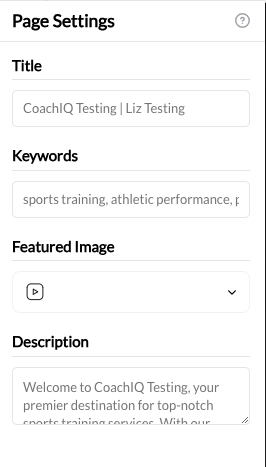
3
Enter Your Title
Type your optimized title in the Title field. Remember to keep it under 60 characters.
4
Add Keywords
Enter 3-5 relevant keywords in the Keywords field, separated by commas.Example:
basketball training austin, youth basketball coach, private basketball lessons5
Write Your Description
Craft your meta description in the Description field. Keep it between 150-160 characters with a clear call-to-action.
6
Publish Changes
Click Publish to make your updates live.
Quick reference: Page-by-page guide
Common mistakes to avoid
Using the same title for every page
Using the same title for every page
Each page needs a unique title. Duplicate titles confuse search engines and miss opportunities to rank for different keywords.
Writing for search engines, not humans
Writing for search engines, not humans
If your title or description sounds unnatural, rewrite it. Real humans need to want to click. “Basketball Training Basketball Coach Basketball Austin TX” is spam, not optimization.
Forgetting the call-to-action
Forgetting the call-to-action
Every description should tell people what to do: “Book today,” “Get started,” “See pricing,” “Join now.” Give them the next step.
Ignoring your competition
Ignoring your competition
Search for your keywords and see what competitors write. Don’t copy them, but understand what you’re competing against.
Setting and forgetting
Setting and forgetting
Review your meta information quarterly. Services change, locations expand, and messaging evolves. Keep it current.
Common questions
Should I change the titles CoachIQ created?
Should I change the titles CoachIQ created?
Only if your business has changed (new location, rebranding, new services) or you’re adding new pages. The initial optimization is professional-grade.
How long until changes show in Google?
How long until changes show in Google?
Google typically re-crawls active sites within days to weeks. Major changes may appear faster. You can request indexing through Google Search Console.
Do keywords in the meta keywords field affect rankings?
Do keywords in the meta keywords field affect rankings?
No. Google has said it doesn’t use the meta keywords tag for ranking. Filling it in can still help you keep track of what each page targets. If you leave it empty, your site uses a general sports-training keyword list, which has no effect on Google.
What if my business serves multiple cities?
What if my business serves multiple cities?
Create location-specific pages or mention multiple cities naturally in your content. Your home page might target your primary city while blog posts target surrounding areas.
Should I include my phone number in descriptions?
Should I include my phone number in descriptions?
Generally no - it takes up valuable character space. People will find contact info once they click through to your site.