Quick navigation: Schedule → Calendar → Click booking → Cancel
Who can cancel bookings?
- Admins & Coaches
- Athletes
Full cancellation control:
- Cancel any booking at any time
- Cancel single sessions or entire recurring patterns
- Override cancellation policies
- No restrictions
How to cancel a booking
1
Find the booking
Two ways to access:
- From Calendar: Schedule → Calendar → Click the booking
- From Athlete Profile: People → Clients → Select athlete → Upcoming Bookings
2
Open booking details
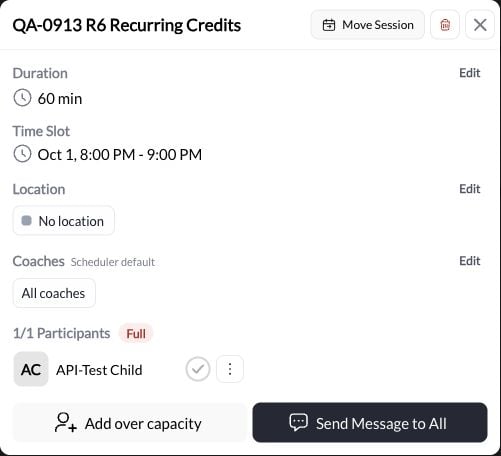
Click on the specific booking to open the details panel.You’ll see:
- Athlete name
- Session time/date
- Scheduler type
3
Click 'Cancel'
Look for the Cancel button (usually red or in actions menu).Click it to initiate cancellation.
4
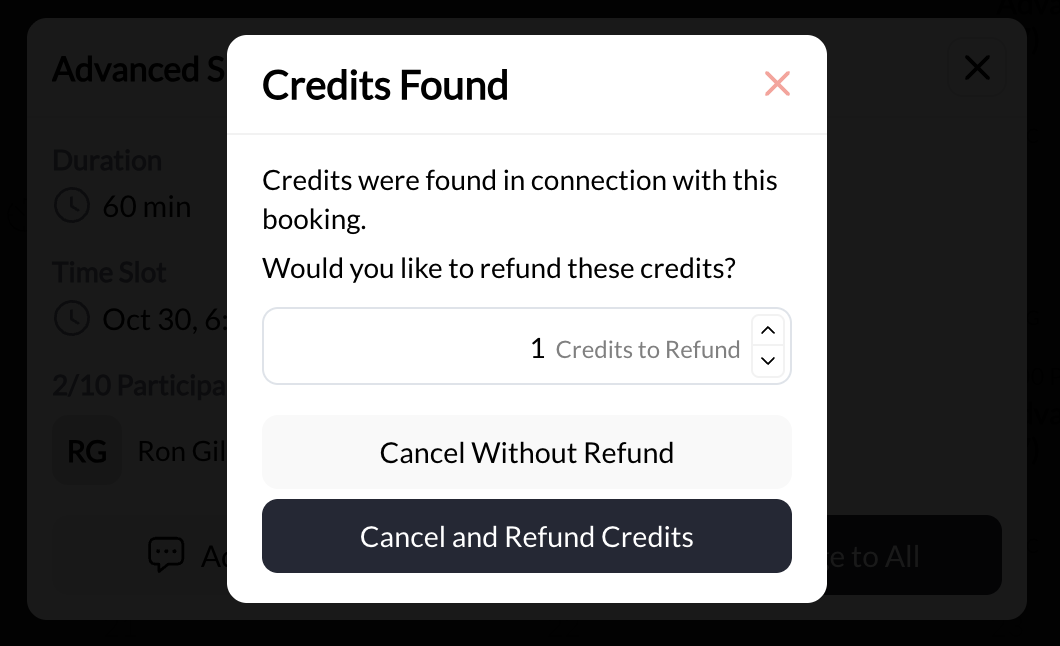
Confirm cancellation
System asks for confirmation to prevent accidental cancellations.Note: If a client booked with a credit the system will prompt you to refund the credit to their account or not.
Cancel to complete the cancellation.

Booking canceled! Session removed from calendar, athlete notified, credits handled per policy.
What happens when you cancel?
Calendar Updates
Immediate changes:
- Booking removed from your calendar
- Time slot becomes available again
- Athlete’s calendar updated
- Capacity opens up (for group sessions)
Notifications Sent
Who gets notified:
- Athlete receives cancellation email/SMS
- You receive confirmation
- Any followers/coaches assigned to session
Credit Handling
Depends on your policy:
- With proper notice: Credits refunded
- Late cancellation: Credits forfeited
- Free sessions: No credit impact
Recurring Bookings
For recurring sessions:
- Canceling ONE occurrence: Only that session canceled
- Canceling ENTIRE pattern: All future sessions removed
- Already-completed sessions: Unaffected
Cancellation scenarios and outcomes
Coach cancels with advance notice
Scenario: You cancel athlete’s session 48 hours in advanceWhat happens:
- ✅ Booking removed from calendar
- ✅ Athlete notified immediately
- ✅ Credits refunded (if credit-based)
- ✅ Athlete can rebook another time
- ✅ Professional courtesy maintained
Coach cancels last-minute
Scenario: You cancel session on same day (emergency)What happens:
- ✅ Booking removed
- ✅ Athlete notified
- ✅ Credits refunded (coach cancellations typically refund regardless of timing)
- ⚠️ May impact athlete satisfaction
- Call/text athlete directly (don’t rely only on auto-notification)
- Offer priority rebooking
- Consider offering extra session or discount for inconvenience
Athlete cancels with proper notice
Scenario: Athlete cancels 24+ hours before session (within your policy)What happens:
- ✅ Booking removed
- ✅ You’re notified
- ✅ Credits refunded to athlete
- ✅ Time slot opens for other bookings
- ✅ No penalty
Athlete cancels late (violates policy)
Scenario: Athlete cancels with only 6 hours notice (policy requires 24 hours)What happens:
- ✅ Booking removed
- ❌ Credits NOT refunded (forfeited per policy)
- ✅ You’re notified
- ⚠️ Time slot might be too late to fill
- Strict enforcement: No refund, credits lost
- One-time courtesy: Manually refund credits, warn about future
- Consider circumstances: Legit emergency? Offer flexibility
- Edit Scheduler: Adjust your minimum cancellation notice to your policy to avoid cancellation through the system
Athlete no-shows
Athlete no-shows
Scenario: Athlete doesn’t show up and doesn’t cancelWhat happens:
- ✅ Session time passes
- ❌ Credits NOT refunded (forfeited)
- ⚠️ Wasted time slot
- ⚠️ Potential revenue loss
- Message athlete/parent to check in
- Enforce no-show policy
- Consider pattern (multiple no-shows = conversation needed)
Canceling group session with participants
Scenario: You need to cancel a group class with 8 athletes bookedWhat happens:
- ✅ All athletes can be notified at once
- ✅ Credits refunded to all participants
- ✅ Full capacity opens up
- Send group message explaining cancellation
- Offer alternative date/time
- Consider posting on social media if you have regular group classes
Canceling one occurrence in recurring series
Scenario: Athlete’s recurring Tuesday sessions, need to cancel just Oct 15What happens:
- ✅ Single session removed
- ✅ All other Tuesdays remain scheduled
- ✅ Credits refunded (if applicable)
- ✅ Recurring pattern continues
- Click Oct 15 session → Cancel
- OR use “Skip” in Occurrences view (see Recurring Bookings)
Canceling entire recurring pattern
Scenario: Athlete discontinues training, needs to cancel all future sessionsWhat happens:
- ✅ All remaining recurring sessions deleted
- ✅ Athlete notified once
- ✅ Credits NOT automatically refunded (handle manually if needed)
- ✅ Calendar cleared of all future occurrences
- Click any session in recurring series
- Open Occurrences view
- Delete entire pattern
Understanding cancellation policies
Your cancellation policy determines credit refund rules. Configure this in your scheduler settings.Common policy structures
- 24-Hour Policy (Recommended)
- Strict Same-Day Policy
- Lenient Policy
- Hybrid/Tiered
Configuration:
- Cancel 24+ hours before: Credits refunded
- Cancel 24 hours: Credits forfeited
- No-show: Credits forfeited
- Gives you time to fill the slot
- Fair to athletes who plan ahead
- Industry standard
Setting your policy
Where to configure:- Go to scheduler settings
- Find “Cancellation Policy” section
- Set time window (e.g., 24 hours)
- Choose refund behavior
- Display policy on booking page
- Include in confirmation emails
- Remind athletes periodically
Credit refund scenarios
| Scenario | Credits Refunded? | Notes |
|---|---|---|
| Coach cancels anytime | ✅ Yes (always) | Regardless of timing, coach cancellations refund credits |
| Athlete cancels with proper notice | ✅ Yes | Within policy window (e.g., 24+ hours) |
| Athlete cancels late | ❌ No | Outside policy window = forfeited |
| Athlete no-show | ❌ No | Credits used, session counted |
| Free session canceled | N/A | No credits involved |
| Paid session canceled (proper notice) | ✅ Yes | Refund to original payment method or credit account for an alternative training session |
| Recurring pattern deleted | Manual | Handle refunds on case-by-case basis |
Best practices for cancellations
Clear Policy
Document and share your cancellation policy:
- On website booking page
- In welcome packet
- In confirmation emails
- Verbally during onboarding
Offer Alternatives
When you cancel, immediately offer rebooking options:
- “Can we move to Thursday?”
- “Next week same time work?”
Use Discretion
Enforce policies consistently but allow for:
- Legitimate emergencies
- First-time exceptions
- Long-term loyal clients
Track Patterns
Monitor cancellation rates by:
- Individual athletes
- Time slots
- Session types
Quick reference: Cancellation checklist
When canceling a booking:- Cancel as soon as you know (maximize notice time)
- Send personal message (don’t rely only on auto-notification)
- Offer alternative times/dates
- Confirm credit refund status with athlete
- Note reason for cancellation (for your records)
- For recurring sessions: Clarify if this is one session or entire pattern
- For group sessions: Consider group message/announcement
- Follow up day after to confirm athlete received notice
Next steps
Recurring Bookings
Understand how cancellations work within recurring patterns
Scheduler Settings
Configure your cancellation policies and rules
Credit System Guide
Deep dive into how credits work with cancellations
Related articles
Booking Types
Understand different booking methods
Calendar Management
Navigate and filter to find bookings to cancel
Troubleshooting
Fix common booking and cancellation issues
You now understand: How to cancel bookings, what happens to credits and notifications, and how to handle various cancellation scenarios professionally.
Questions about cancellation policies? Our support team can help you configure the optimal cancellation rules for your coaching business. Contact Support