

Setup time: 3 minutes
Cost: Free (you only pay for ads)
What you’ll track: Ad clicks, conversions, and website visitors for retargeting
Cost: Free (you only pay for ads)
What you’ll track: Ad clicks, conversions, and website visitors for retargeting
What is Facebook Pixel?
Facebook Pixel is a tracking code that measures how effective your Facebook and Instagram ads are. It helps you retarget website visitors, track bookings from ads, and optimize campaigns for people most likely to become clients.Get your Facebook Pixel ID
1
Access Facebook Events Manager
- Go to Facebook Business Suite
- Click All tools (menu icon)
- Select Events Manager under “Measure & Report”
You need a Facebook Business account. If you don’t have one, Facebook will prompt you to create it (free).
2
Create a Pixel
- Click Connect data sources (green button)
- Select Web
- Choose Facebook Pixel
- Name your pixel (e.g., “CoachIQ Website”)
- Enter your website URL
- Click Create
3
Copy your Pixel ID
Your Pixel ID appears at the top of the setup page.
It’s a 15-16 digit number like: 532098336535001
Add Facebook Pixel to CoachIQ
1
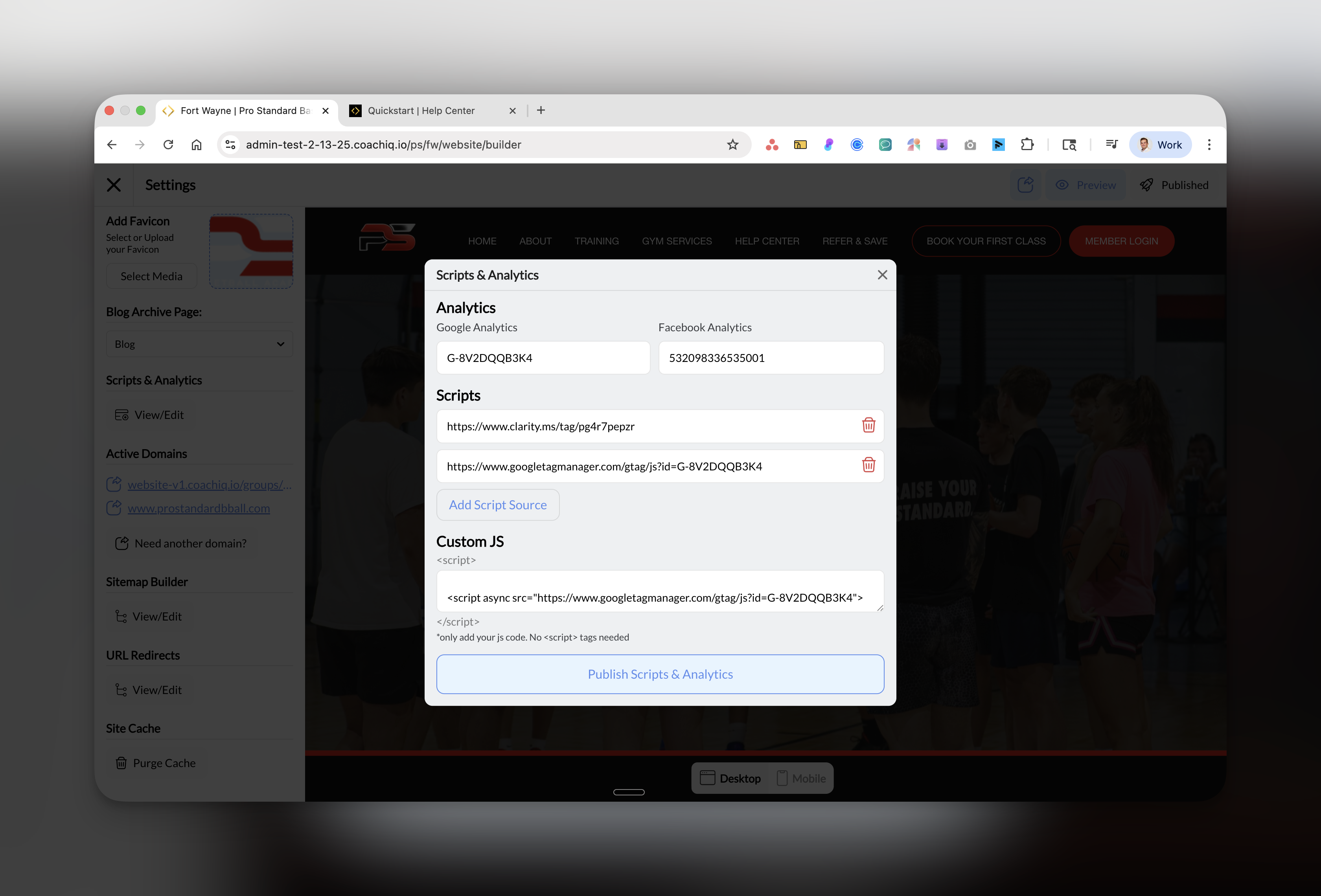
Open Scripts & Analytics
- Go to Dashboard → Website Builder
-
Click Scripts & Analytics in the left sidebar
2
Paste your Pixel ID
- In the Facebook Analytics field, paste your Pixel ID
- Only paste the numbers (e.g., 532098336535001)
- Don’t include any extra text or spaces
3
Publish your changes
Click the blue Publish Scripts & Analytics button at the bottom.
Success! Facebook Pixel is now tracking your website. Test it with Facebook’s Pixel Helper.
Verify Pixel is working
- Facebook Pixel Helper
- Events Manager
- Install Facebook Pixel Helper Chrome extension
- Visit your website
- Click the Pixel Helper icon
- It should show “1 pixel found” in green
What Facebook Pixel tracks automatically
Once installed, Facebook automatically tracks:- PageView: Every page visit
- ViewContent: When someone views your services
- Contact: Form submissions
- Schedule: Booking interactions
- Purchase: Completed transactions
Set up retargeting audiences
Create a website visitor audience:
- Go to Ads Manager → Audiences
- Click Create audience → Custom Audience
- Choose Website
- Select “All website visitors”
- Set retention to 30-180 days
- Name it “Website Visitors - Retargeting”
Common questions
Do I need Facebook Pixel if I'm not running ads yet?
Do I need Facebook Pixel if I'm not running ads yet?
Yes! Install it now to build your retargeting audience. When you’re ready to run ads, you’ll already have data on past visitors.
Does Pixel work for Instagram ads too?
Does Pixel work for Instagram ads too?
Yes, Facebook Pixel tracks both Facebook and Instagram ads since they use the same advertising platform (Meta).
Will it slow down my website?
Will it slow down my website?
No, the Pixel loads asynchronously and won’t affect your site speed or user experience.
What about iOS 14+ privacy changes?
What about iOS 14+ privacy changes?
Pixel still works but may track fewer conversions. Facebook’s Aggregated Event Measurement handles this automatically.
Best practices for coaches
Conversion events to prioritize:
- Book a Session - Most important for tracking ROI
- Contact Form - Track lead generation
- View Schedule - Shows purchase intent
- Sign Up - Newsletter or program registration
Retargeting strategy:
- 0-7 days: Show testimonials and social proof
- 8-30 days: Offer a free consultation or trial
- 31-90 days: Share success stories and transformations
- 90+ days: Seasonal promotions or new programs
Troubleshooting
Next steps
Create your first ad
Launch a Facebook ad campaign targeting your local area
Build custom audiences
Set up retargeting based on specific page visits
Track conversions
Set up conversion events for bookings and signups
Add Microsoft Clarity
See how users interact with your site
Pro tip: Run a small $5/day retargeting campaign to stay top-of-mind with website visitors. This often has the highest ROI for coaching businesses.