

Where to find this: Payments → Transactions → Click transaction → Refund
When to issue refunds
Common refund scenarios: Client request:- Changed their mind
- Can’t attend purchased session
- Dissatisfied with service
- Duplicate charge
- Charged wrong amount
- Charged wrong client
- Product misconfigured
- Technical error
- Service issue compensation
- Retention gesture
- Promotional adjustment
Refund policies vary by coach. Define your refund policy clearly in terms and conditions.
Full vs. partial refunds
- Full Refund
- Partial Refund
Return entire payment amountClient receives 100% of what they paid.When to use:
- Complete cancellation before service
- Major service failure
- Accidental duplicate charge
- Client never received product/access
How to issue a refund
1
Find the transaction
Go to Payments → Transactions and locate the transaction to refund.Search by client name, amount, or date if needed.
2
Click Open under source column
Redirects to transcation on Stripe
3
Click Refund button
Button appears in the top right corner (if transaction eligible for refund).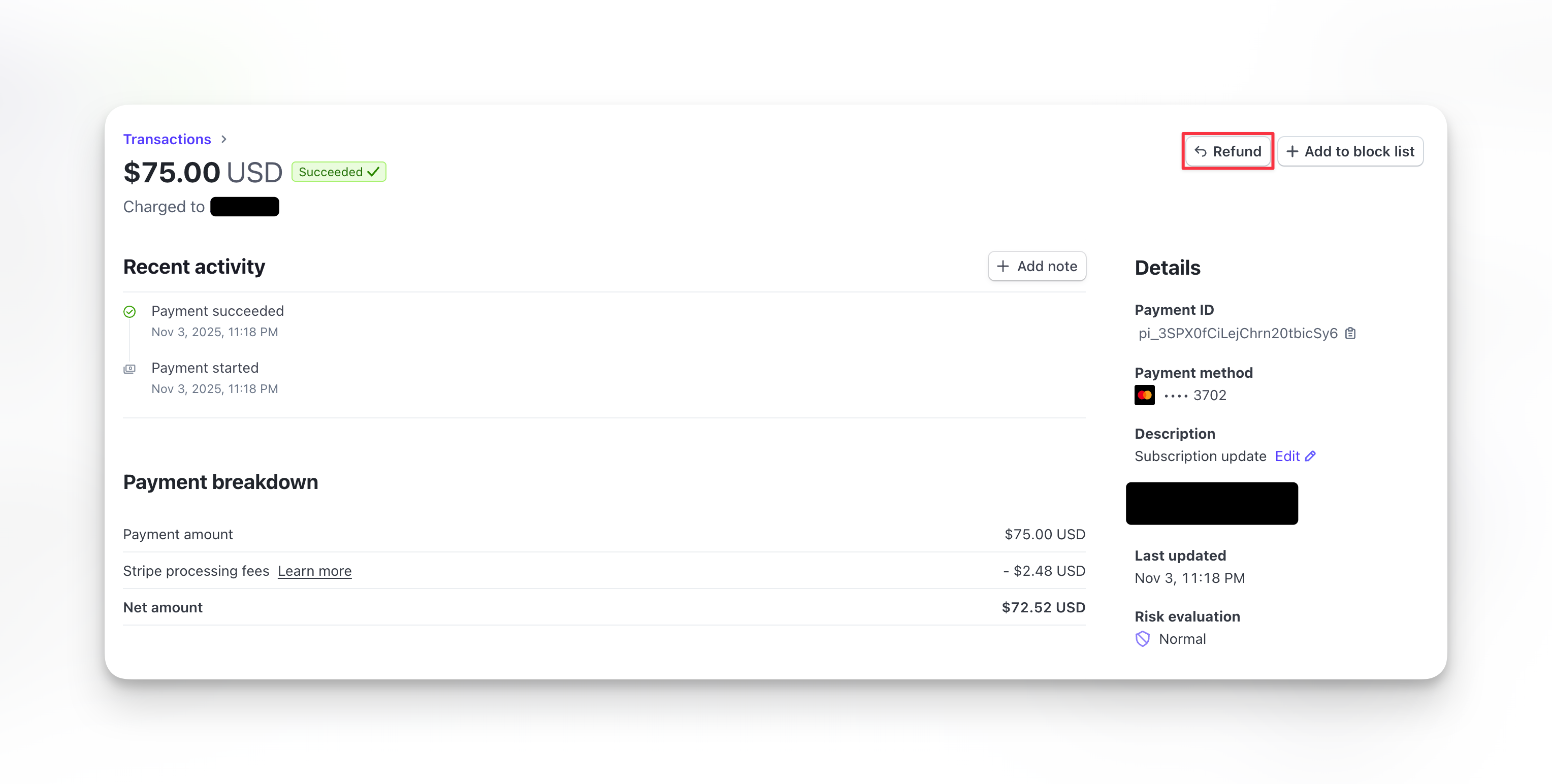
4
Choose refund amount
Full refund: Leave default amount (entire transaction)Partial refund: Enter specific dollar amount to refundAmount must be less than or equal to original charge.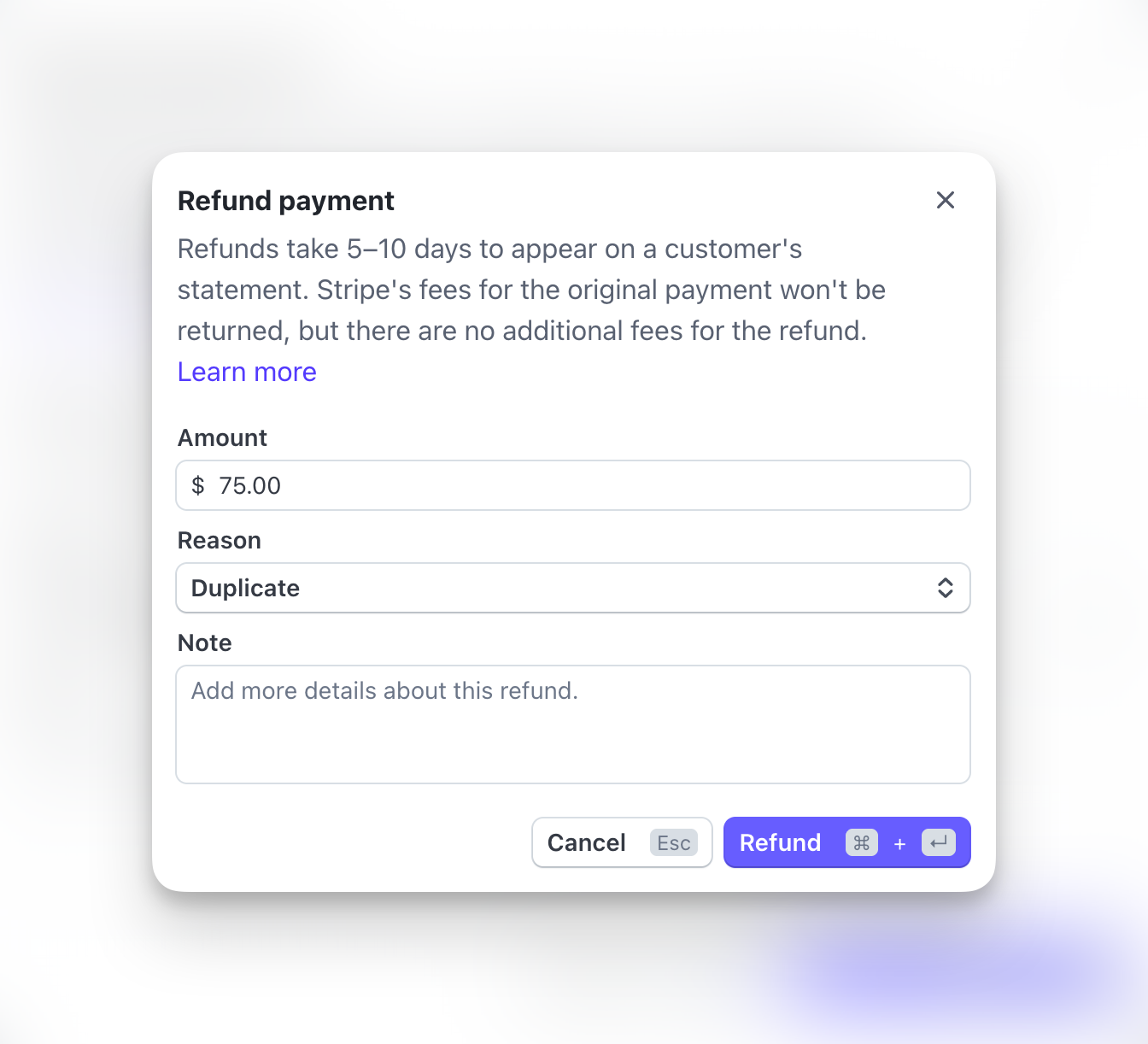
5
Add reason (optional)
Note why you’re issuing refund:
- Client request
- Service issue
- Duplicate charge
- Other
6
Confirm refund
Review details and click Confirm Refund.
Refund processing. Money returns to client’s original payment method within 5-10 business days.
What happens after refund
Immediate:- Refund appears in Transactions list with negative amount
- Transaction status updates to “Refunded”
- CoachIQ records refund
- Client receives refund confirmation email
- Stripe processes refund
- Funds deducted from your Stripe balance
- Money appears in client’s bank account
- Timeline depends on client’s bank
Refund timeline is controlled by banks, not CoachIQ or Stripe. You can’t speed it up.
Refunding subscription payments
When refunding subscription charges, additional options appear:- Refund only
- Refund + Cancel
Issue refund, keep subscription activeMoney returned but subscription continues billing.When to use:
- Service issue compensation
- Billing adjustment
- Goodwill gesture without cancellation
Refund limitations
Time limits:- Stripe allows refunds up to 180 days after charge
- After 180 days, contact Stripe support for special handling
- Can’t refund more than original charge
- Can refund less (partial refund)
- Can issue multiple partial refunds until full amount refunded
- Can’t refund same transaction twice
- Can’t reverse a refund once processed
- Can’t refund payments that failed
- No money was collected, so nothing to refund
Refund fees
Stripe processing fees: Original charge: You paid 2.9% + $0.30 After refund:- Transaction fee NOT refunded by Stripe
- You lose the fee even though client got money back
- Client pays $100
- Stripe takes $3.20 in fees
- You receive $96.80
- You refund $100 to client
- Stripe charges you $100
- Net loss: 103.20 (original 100 + $3.20 fees)
Factor fees into refund policies. Some coaches deduct Stripe fees from refunds to avoid this loss.
Partial refund calculations
Common scenarios: Prorated monthly cancellation:- $200/month subscription
- Client cancels on day 15 of 30-day month
- Unused: 15 days
- Refund: 100
- 10-session package for $650
- Client used 3 sessions
- Remaining: 7 sessions
- Refund: 455
- $100 charge
- Stripe fee: $3.20
- Refund after fee: $96.80
Refund policies
Elements of clear refund policy: Time window:- How long after purchase can client request refund?
- Example: “30-day money-back guarantee” or “No refunds after 48 hours”
- What qualifies for refund?
- What doesn’t qualify?
- Example: “Unused sessions only” or “Cancel 24 hours before session”
- How does client request refund?
- How long does approval take?
- Example: “Email requests processed within 2 business days”
- Emergency situations
- Injury or illness
- Special circumstances
- On checkout page
- In terms and conditions
- In confirmation emails
Handling refund requests
Best practices:1
Listen to client
Understand why they want refund. Sometimes issue can be resolved without refund.
2
Review your policy
Does request qualify based on your terms?
3
Offer alternatives
Before refunding, consider:
- Rescheduling session
- Transferring credits to friend/family
- Service credit for future use
- Discounted makeup session
4
Process refund promptly
If refund warranted, process within 24-48 hours. Delays increase frustration.
5
Communicate clearly
Explain what to expect:
- Refund amount
- Processing timeline (5-10 days)
- Account changes (credits removed, access ended)
6
Follow up
After refund processes, check in to ensure client satisfied with resolution.
Refunds vs. chargebacks
Refund (you initiate):- You control timing and amount
- No additional fees
- Maintains client relationship
- Professional resolution
- Bank controls outcome
- $15 chargeback fee even if you win
- Damages relationship
- Affects Stripe account health
Always offer to refund if client unhappy. Prevents chargebacks and maintains goodwill.
Common refund scenarios
Client can't attend session they booked
Client can't attend session they booked
Your options:
- Reschedule session (no refund needed)
- Issue credit for future use
- Issue full refund if within policy window
Client bought wrong product
Client bought wrong product
Process:
- Issue full refund for incorrect product
- Client purchases correct product
- Or manually adjust credits if appropriate
Duplicate charge - client charged twice
Duplicate charge - client charged twice
Process:
- Verify duplicate (check transactions)
- Issue full refund for one charge
- Keep other charge active
- Apologize for error
Client wants prorated refund mid-subscription
Client wants prorated refund mid-subscription
Process:
- Calculate unused portion of period
- Issue partial refund for prorated amount
- Cancel subscription (at period end or immediately)
Client unhappy with service
Client unhappy with service
Steps:
- Understand specific issue
- Offer to remedy (makeup session, different coach, etc.)
- If unresolvable, issue refund per policy
- Document for quality improvement
Tracking refunds
Monitor refund metrics: Refund rate: (Refunds / Total transactions) × 100 Average refund amount: Total refunded / Number of refunds Refund reasons: Track most common causes Refund cost: Total revenue lost to refunds + fees Use data to:- Identify problem areas (policies, products, services)
- Improve client satisfaction
- Reduce refund requests
- Adjust policies if needed