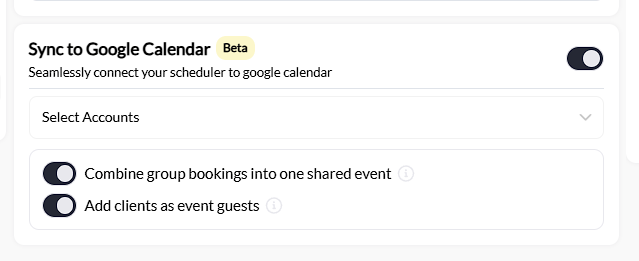
Where to find this: Schedule → Schedulers → [Select Scheduler] → Google
What you’ll accomplish
Connect your Google Calendar to a scheduler so all bookings automatically appear on your personal calendar. This keeps your CoachIQ schedule in sync with your everyday calendar without manual entry.Beta feature: Google Calendar sync is currently in beta. Core functionality is stable, but some features may be refined based on feedback.
How the sync works
Google Calendar sync is one-way: CoachIQ → Google Calendar.| Action in CoachIQ | Result in Google Calendar |
|---|---|
| Athlete books session | Event created |
| Booking rescheduled | Event updated |
| Booking cancelled | Event removed |
| Recurring booking created | Recurring event created |
What gets synced
Each booking creates a Google Calendar event with:- Session date and time
- Athlete name
- Session type/scheduler name
- Duration
Connecting Google Calendar
Open your scheduler settings
Go to Schedule → Schedulers and click on the scheduler you want to sync.
Connect your Google account
Click Select Accounts and sign in with your Google account. Grant CoachIQ permission to create and manage calendar events.
Key things to know
Each scheduler syncs independently
You connect Google Calendar per scheduler, not account-wide. This gives you flexibility:- Sync only specific schedulers to your calendar
- Connect different Google accounts to different schedulers
- Keep some schedulers private (not synced)
Sync is one-way only
This is the most important concept to understand:| Where you make changes | What happens |
|---|---|
| CoachIQ (correct) | Changes sync to Google Calendar |
| Google Calendar (incorrect) | Nothing happens in CoachIQ |
Recurring bookings sync correctly
When an athlete books a recurring session:- CoachIQ creates a recurring event in Google Calendar
- The recurrence pattern matches (weekly, bi-weekly, etc.)
- Deleting the entire recurring schedule removes all instances from Google Calendar
Common questions
Can I sync to Apple Calendar or Outlook?
Google Calendar sync is the only direct integration currently available. However, if you use iCal feeds, you can subscribe to your CoachIQ calendar from Apple Calendar or Outlook. See Calendar Overview for iCal feed options.
Why don't I see past bookings?
Sync only applies to bookings made AFTER you enable the integration. Existing bookings before you connected won’t appear on Google Calendar.
Can athletes see my Google Calendar?
No. This sync only sends events TO your Google Calendar. Athletes cannot see your Google Calendar or any events on it. They only see availability through CoachIQ’s booking system.
What if I have multiple coaches?
Each coach can connect their own Google account to schedulers they’re assigned to. The sync sends events to whichever Google account is connected to that scheduler.
Will this block time on my Google Calendar for availability?
The sync creates events on your Google Calendar, but CoachIQ does not read your Google Calendar to determine availability. Your CoachIQ availability is set separately in your availability templates.
Troubleshooting
Events not appearing on Google Calendar
Check these things:
- Sync is toggled ON in the scheduler’s Google settings
- You’ve connected a Google account (not just enabled the toggle)
- The booking was made AFTER you enabled sync
- Check the correct Google Calendar (you may have multiple)
Events showing wrong information
If event details appear incorrect (wrong time, missing info), the booking data in CoachIQ may need updating. Edit the booking in CoachIQ and the Google Calendar event will update.
Cancelled booking still on Google Calendar
In rare cases, cancellation sync may be delayed. Wait a few minutes and refresh your Google Calendar. If the event persists, you can manually delete it from Google Calendar (this won’t affect CoachIQ).