> ## Documentation Index
> Fetch the complete documentation index at: https://help.coachiq.io/llms.txt
> Use this file to discover all available pages before exploring further.
# Pricing Section
> The Pricing Options feature in CoachIQ allows you to effectively manage and showcase your products, whether custom or existing.
## **Pricing Section in the Web-builder**
 ### **Introduction**
This feature is designed to help you streamline the selling process, enhance customer experience, and maximize your revenue potential by providing flexible pricing structures.
### **Adding Products**
CoachIQ offers two main methods to add products to your pricing section: Custom Products and Existing CoachIQ Products.
### **Introduction**
This feature is designed to help you streamline the selling process, enhance customer experience, and maximize your revenue potential by providing flexible pricing structures.
### **Adding Products**
CoachIQ offers two main methods to add products to your pricing section: Custom Products and Existing CoachIQ Products.
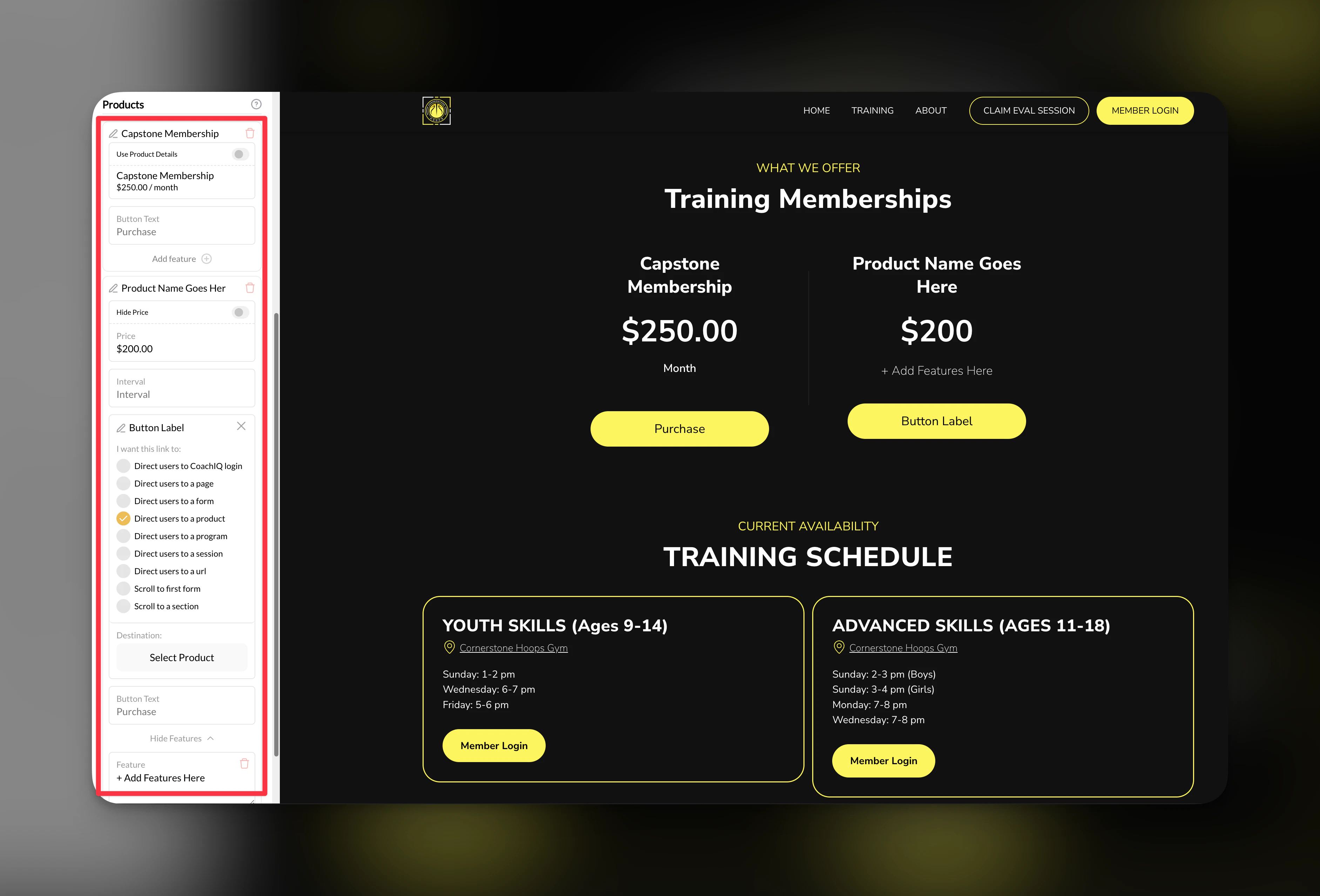 #### **1. Custom Products**
Custom Products are ideal if you sell services or items outside CoachIQ. Here's how to add them:
* **Click the Plus Button**: Initiate the process by clicking the plus button in your pricing section.
* **Select "Add Custom Product"**: This option is for products not sold through CoachIQ.
* **Example**: In-person skills session
* **Label**: Name your product, e.g., "In-person skills session".
* **Pricing Interval**: Set how often pricing applies, such as per session.
* **Target URL**: Enter the URL where the purchase button directs users.
* **Features**: List features such as:
* 60-minute session
* Access to training materials
* **Flexibility**: Add multiple features and as many products as needed.
#### **2. Existing CoachIQ Products**
If you're already selling memberships or products through CoachIQ, follow these steps:
* **Click the Plus Button**: Start by clicking the plus button.
* **Select "CoachIQ Product"**: Choose from your existing product list.
* **Automatic Features**: Features are imported from your current settings.
* **Updates**: Modify features as necessary to reflect current offerings.
### **Additional Notes**
* **Structure Consistency**: The pricing section retains consistent heading and subheading structures for clarity.
* **Customization**: For custom products, you can specify details such as pricing intervals and target URLs.
* **Feature Import**: When adding existing CoachIQ products, all associated features are automatically imported, but you have the flexibility to update them.
### **Tips and Best Practices**
* **Regular Updates**: Keep your product features and pricing intervals updated to reflect changes in your offerings.
* **Clear Descriptions**: Use concise and descriptive labels for products to enhance user understanding.
* **Targeted URLs**: Ensure that the target URL is accurate and leads customers to the correct purchase page.
### **Frequently Asked Questions**
> **Q: Can I add multiple custom products at once?** **A: Yes, you can add as many custom products as you need, each with its unique features and pricing details.**
> **Q: Are features for existing products automatically updated if I change them in CoachIQ?** **A: No, you'll need to manually update the imported features if you make changes to the original product settings.**
#### **1. Custom Products**
Custom Products are ideal if you sell services or items outside CoachIQ. Here's how to add them:
* **Click the Plus Button**: Initiate the process by clicking the plus button in your pricing section.
* **Select "Add Custom Product"**: This option is for products not sold through CoachIQ.
* **Example**: In-person skills session
* **Label**: Name your product, e.g., "In-person skills session".
* **Pricing Interval**: Set how often pricing applies, such as per session.
* **Target URL**: Enter the URL where the purchase button directs users.
* **Features**: List features such as:
* 60-minute session
* Access to training materials
* **Flexibility**: Add multiple features and as many products as needed.
#### **2. Existing CoachIQ Products**
If you're already selling memberships or products through CoachIQ, follow these steps:
* **Click the Plus Button**: Start by clicking the plus button.
* **Select "CoachIQ Product"**: Choose from your existing product list.
* **Automatic Features**: Features are imported from your current settings.
* **Updates**: Modify features as necessary to reflect current offerings.
### **Additional Notes**
* **Structure Consistency**: The pricing section retains consistent heading and subheading structures for clarity.
* **Customization**: For custom products, you can specify details such as pricing intervals and target URLs.
* **Feature Import**: When adding existing CoachIQ products, all associated features are automatically imported, but you have the flexibility to update them.
### **Tips and Best Practices**
* **Regular Updates**: Keep your product features and pricing intervals updated to reflect changes in your offerings.
* **Clear Descriptions**: Use concise and descriptive labels for products to enhance user understanding.
* **Targeted URLs**: Ensure that the target URL is accurate and leads customers to the correct purchase page.
### **Frequently Asked Questions**
> **Q: Can I add multiple custom products at once?** **A: Yes, you can add as many custom products as you need, each with its unique features and pricing details.**
> **Q: Are features for existing products automatically updated if I change them in CoachIQ?** **A: No, you'll need to manually update the imported features if you make changes to the original product settings.**