> ## Documentation Index
> Fetch the complete documentation index at: https://help.coachiq.io/llms.txt
> Use this file to discover all available pages before exploring further.
# Numbered Steps Section
> Number blocks are a powerful feature in CoachIQ's Web Builder, designed to help you break down processes, highlight training steps, or outline benefits in a clear and engaging format
## **How to Use Number Blocks in CoachIQ's Web Builder**
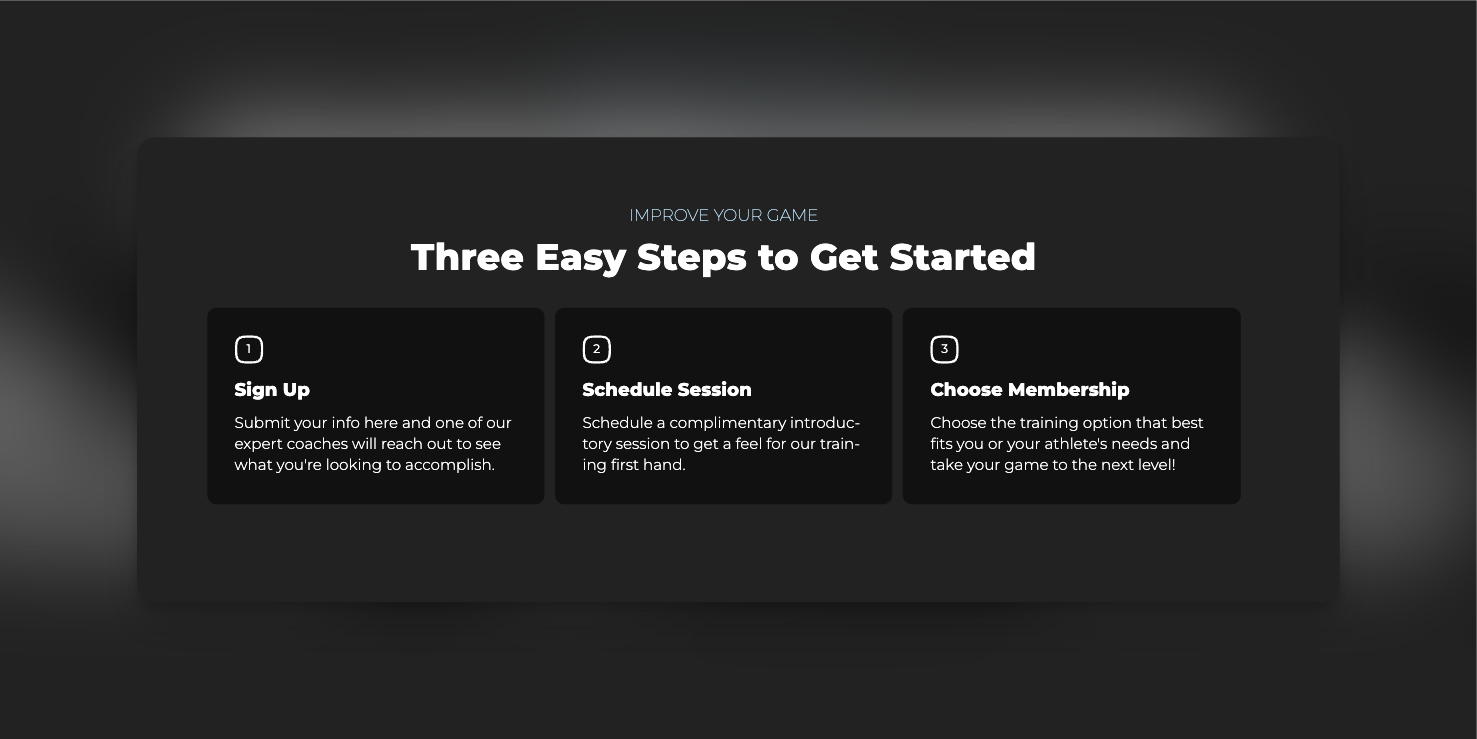 Number blocks are a powerful feature in CoachIQ's Web Builder, designed to help you break down processes, highlight training steps, or outline benefits in a clear and engaging format. This guide will walk you through the steps to add and customize number blocks to captivate your website visitors effectively.
### **Steps to Add and Customize Number Blocks**
1. **Access the Web Builder**
* Log in to your CoachIQ account.
* Open the Web Builder from your dashboard.
2. **Select the Number Block**
* Click on “Add Section.”
* Choose “Number Steps Section” from the available options.
3. **Add Your Content**
* **Title**: Keep it simple and engaging (e.g., “Three Easy Steps to Get Started”).
* **Step Headings**: Use clear, action-oriented phrases for each step.
* **Descriptions**: Provide concise details that guide the user through your process.
4. **Customize the Design**
* **Background & Colors**: Adjust to match your brand identity.
* **Icons & Numbers**: Choose icons or customize the style of the numbers.
* **Spacing & Alignment**: Ensure the block fits seamlessly within your page layout.
5. **Preview and Publish**
* Check how your number block appears on different devices.
* Save and publish your changes.
### **Example Number Blocks**
Here are some examples of how you can use number blocks to enhance your web content:
1. **Simple Enrollment Process**
* Register Online
* Book Your Free Evaluation
* Join a Training Program
2. **Skill Development Pathway**
* Assess Your Skills
* Create a Custom Plan
* Track Your Progress
3. **Athlete Onboarding Experience**
* Fill Out Your Athlete Profile
* Meet Your Coach
* Start Training
4. **Training Program Selection**
* Choose Your Focus
* Select Your Schedule
* Unlock Premium Tools
5. **Steps to Level Up Your Game**
* Sign Up for a Membership
* Attend Weekly Training
* Review and Improve
By using number blocks effectively, you can simplify complex information and motivate website visitors to take action.
### **Tips and Best Practices**
* **Consistency**: Ensure that the style and tone of your number blocks match the rest of your website.
* **Clarity**: Use straightforward language and action-oriented headings.
* **Visual Appeal**: Select colors and icons that enhance readability and engagement.
### **Frequently Asked Questions**
**Q: Can I use custom icons for each step in a number block?** A: Yes, you can choose from a variety of icons or upload your own to personalize each step.
**Q: Are number blocks mobile-responsive?** A: Yes, number blocks are designed to be fully responsive, ensuring they look great on all devices.
Number blocks are a powerful feature in CoachIQ's Web Builder, designed to help you break down processes, highlight training steps, or outline benefits in a clear and engaging format. This guide will walk you through the steps to add and customize number blocks to captivate your website visitors effectively.
### **Steps to Add and Customize Number Blocks**
1. **Access the Web Builder**
* Log in to your CoachIQ account.
* Open the Web Builder from your dashboard.
2. **Select the Number Block**
* Click on “Add Section.”
* Choose “Number Steps Section” from the available options.
3. **Add Your Content**
* **Title**: Keep it simple and engaging (e.g., “Three Easy Steps to Get Started”).
* **Step Headings**: Use clear, action-oriented phrases for each step.
* **Descriptions**: Provide concise details that guide the user through your process.
4. **Customize the Design**
* **Background & Colors**: Adjust to match your brand identity.
* **Icons & Numbers**: Choose icons or customize the style of the numbers.
* **Spacing & Alignment**: Ensure the block fits seamlessly within your page layout.
5. **Preview and Publish**
* Check how your number block appears on different devices.
* Save and publish your changes.
### **Example Number Blocks**
Here are some examples of how you can use number blocks to enhance your web content:
1. **Simple Enrollment Process**
* Register Online
* Book Your Free Evaluation
* Join a Training Program
2. **Skill Development Pathway**
* Assess Your Skills
* Create a Custom Plan
* Track Your Progress
3. **Athlete Onboarding Experience**
* Fill Out Your Athlete Profile
* Meet Your Coach
* Start Training
4. **Training Program Selection**
* Choose Your Focus
* Select Your Schedule
* Unlock Premium Tools
5. **Steps to Level Up Your Game**
* Sign Up for a Membership
* Attend Weekly Training
* Review and Improve
By using number blocks effectively, you can simplify complex information and motivate website visitors to take action.
### **Tips and Best Practices**
* **Consistency**: Ensure that the style and tone of your number blocks match the rest of your website.
* **Clarity**: Use straightforward language and action-oriented headings.
* **Visual Appeal**: Select colors and icons that enhance readability and engagement.
### **Frequently Asked Questions**
**Q: Can I use custom icons for each step in a number block?** A: Yes, you can choose from a variety of icons or upload your own to personalize each step.
**Q: Are number blocks mobile-responsive?** A: Yes, number blocks are designed to be fully responsive, ensuring they look great on all devices.