> ## Documentation Index
> Fetch the complete documentation index at: https://help.coachiq.io/llms.txt
> Use this file to discover all available pages before exploring further.
# Content & Media
> The Content & Media block in CoachIQ's web builder is a powerful feature designed to enhance your online presence. It allows you to showcase key information, images, and calls-to-action (CTAs).
## **Using the Content & Media Block in CoachIQ's Web Builder**
 ### **Introduction**
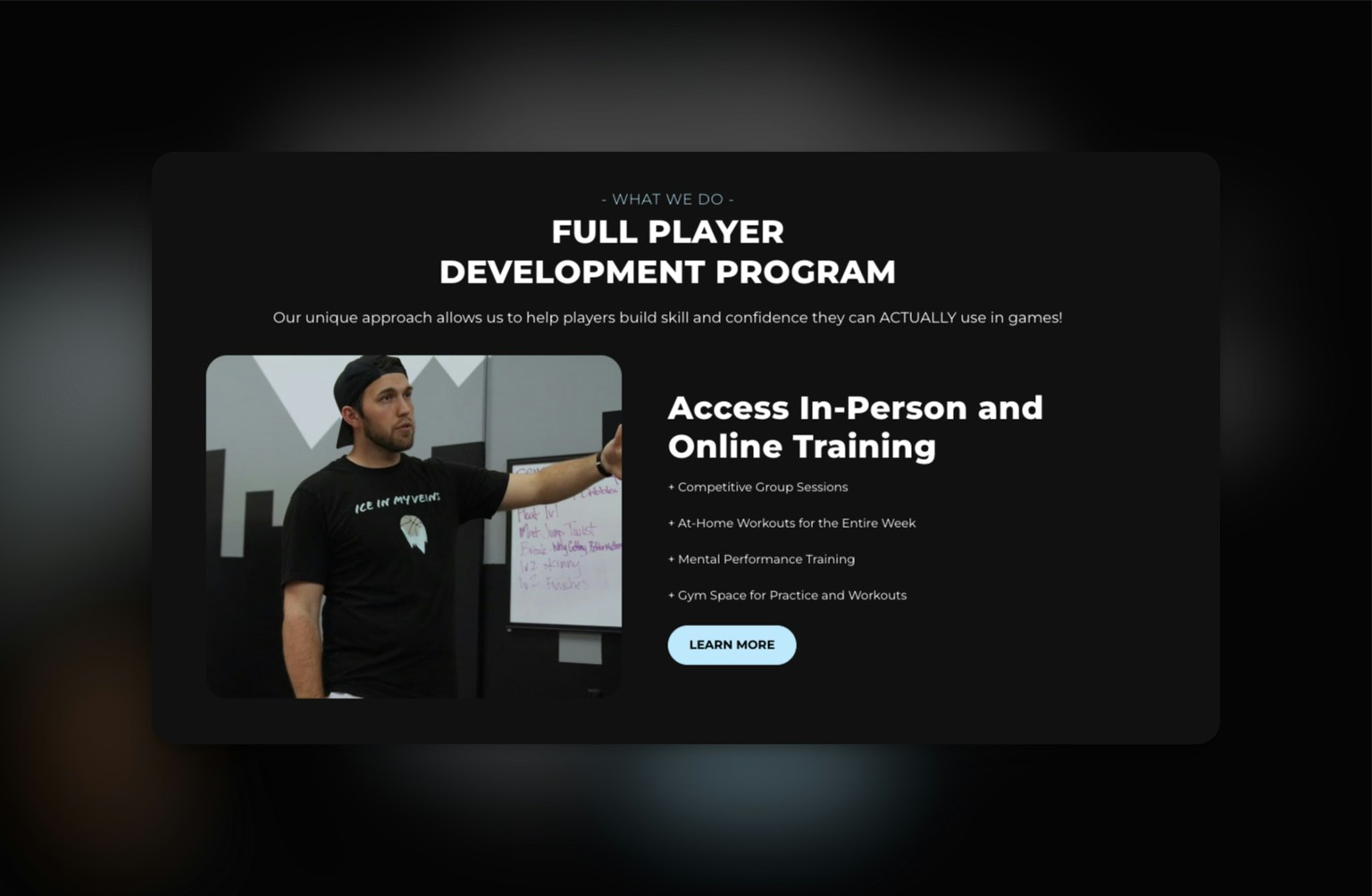
Whether you're a private sports coach looking to make a great first impression or promote your services, this feature can be utilized as a hero section, CTA section, or for various other purposes to drive conversions.
### **Use Cases for Private Sports Coaches**
1. **Hero Section for Your Homepage**
* **Purpose**: Make a strong initial impact by highlighting your unique coaching program or training approach.
* **Example**: Use an engaging photo of you coaching, along with a brief description of your expertise and a “Learn More” button linking to program details.
2. **Call-to-Action for Program Enrollment**
* **Purpose**: Encourage visitors to sign up for your programs or memberships.
* **Example**: Display your main offerings, such as in-person and online training, with a clear CTA button like “Join Now” or “Get Started”.
3. **Feature Key Training Services**
* **Purpose**: Highlight the specific benefits of training with you, such as group sessions or access to gym facilities.
* **Example**: Use a compelling image and list your top services with brief descriptions to attract attention.
4. **Promote Upcoming Events or Camps**
* **Purpose**: Announce dates and details for upcoming sports camps, clinics, or special events.
* **Example**: Include a banner image, event details, and a “Sign Up” button linking to the registration page.
5. **Display Testimonials with Visual Impact**
* **Purpose**: Showcase testimonials or success stories from athletes or parents.
* **Example**: Pair client feedback with a relevant image, adding a CTA like “See More Success Stories” to build credibility.
### **Steps to Add a Content & Media Block**
1. **Access the Web Builder**:
* Log in to CoachIQ, navigate to your dashboard, and open the Web Builder.
2. **Select the Content & Media Block**:
* Click “Add Block” and choose “Content & Media” from the options.
3. **Upload Media**:
* **Image/Video**: Choose an image or video that complements your message, such as a coaching session or an athlete in action.
4. **Add Headline & Description**:
* **Headline**: Write a concise, attention-grabbing headline (e.g., “Full Player Development Program”).
* **Description**: Provide a brief explanation of the benefits or purpose of the content.
5. **Insert a Call-to-Action Button**:
* **Button Text**: Customize the button text to align with your goal, such as “Learn More” or “Join Now”.
* **Link**: Connect the button to the relevant page on your website.
6. **Customize Design**:
* Adjust colors, font, and alignment to match your brand style.
7. **Preview and Publish**:
* Review how the block appears on different devices, then click “Save” and “Publish” to make it live.
> By effectively using the Content & Media block, you can engage visitors, highlight your unique offerings, and encourage action.
### **Tips and Best Practices**
* **Consistency**: Keep your branding consistent across all blocks to create a cohesive look.
* **Engaging Visuals**: Use high-quality images and videos to capture attention.
* **Clear CTAs**: Ensure your CTAs are visible and clearly lead to the next step for users.
### **Frequently Asked Questions**
**Q: Can I use multiple Content & Media blocks on a single page?** A: Yes, you can use multiple blocks to highlight different aspects of your services or programs.
**Q: How can I ensure my images load quickly?** A: Optimize your images for web use by reducing their file size without compromising quality.
### **Introduction**
Whether you're a private sports coach looking to make a great first impression or promote your services, this feature can be utilized as a hero section, CTA section, or for various other purposes to drive conversions.
### **Use Cases for Private Sports Coaches**
1. **Hero Section for Your Homepage**
* **Purpose**: Make a strong initial impact by highlighting your unique coaching program or training approach.
* **Example**: Use an engaging photo of you coaching, along with a brief description of your expertise and a “Learn More” button linking to program details.
2. **Call-to-Action for Program Enrollment**
* **Purpose**: Encourage visitors to sign up for your programs or memberships.
* **Example**: Display your main offerings, such as in-person and online training, with a clear CTA button like “Join Now” or “Get Started”.
3. **Feature Key Training Services**
* **Purpose**: Highlight the specific benefits of training with you, such as group sessions or access to gym facilities.
* **Example**: Use a compelling image and list your top services with brief descriptions to attract attention.
4. **Promote Upcoming Events or Camps**
* **Purpose**: Announce dates and details for upcoming sports camps, clinics, or special events.
* **Example**: Include a banner image, event details, and a “Sign Up” button linking to the registration page.
5. **Display Testimonials with Visual Impact**
* **Purpose**: Showcase testimonials or success stories from athletes or parents.
* **Example**: Pair client feedback with a relevant image, adding a CTA like “See More Success Stories” to build credibility.
### **Steps to Add a Content & Media Block**
1. **Access the Web Builder**:
* Log in to CoachIQ, navigate to your dashboard, and open the Web Builder.
2. **Select the Content & Media Block**:
* Click “Add Block” and choose “Content & Media” from the options.
3. **Upload Media**:
* **Image/Video**: Choose an image or video that complements your message, such as a coaching session or an athlete in action.
4. **Add Headline & Description**:
* **Headline**: Write a concise, attention-grabbing headline (e.g., “Full Player Development Program”).
* **Description**: Provide a brief explanation of the benefits or purpose of the content.
5. **Insert a Call-to-Action Button**:
* **Button Text**: Customize the button text to align with your goal, such as “Learn More” or “Join Now”.
* **Link**: Connect the button to the relevant page on your website.
6. **Customize Design**:
* Adjust colors, font, and alignment to match your brand style.
7. **Preview and Publish**:
* Review how the block appears on different devices, then click “Save” and “Publish” to make it live.
> By effectively using the Content & Media block, you can engage visitors, highlight your unique offerings, and encourage action.
### **Tips and Best Practices**
* **Consistency**: Keep your branding consistent across all blocks to create a cohesive look.
* **Engaging Visuals**: Use high-quality images and videos to capture attention.
* **Clear CTAs**: Ensure your CTAs are visible and clearly lead to the next step for users.
### **Frequently Asked Questions**
**Q: Can I use multiple Content & Media blocks on a single page?** A: Yes, you can use multiple blocks to highlight different aspects of your services or programs.
**Q: How can I ensure my images load quickly?** A: Optimize your images for web use by reducing their file size without compromising quality.