> ## Documentation Index
> Fetch the complete documentation index at: https://help.coachiq.io/llms.txt
> Use this file to discover all available pages before exploring further.
# Understanding CoachIQ's Credit System
> Complete guide to how credits work, why to use them, and how they benefit your coaching business
**New to credits?** Think of them like punch cards or arcade tokens—athletes buy credits upfront, then redeem them for sessions instead of paying each time.
## What are credits?
Credits are a **pre-paid booking currency** that athletes purchase in packages and redeem when booking sessions with you. Instead of paying 50 each time they book, an athlete might buy a "10-Credit Package" for 450 upfront, then use 1 credit per session.
**Real-world analogy**: Like a gym membership punch card or Starbucks rewards—pay once, use credits multiple times.
### The basic credit flow
Athlete buys a credit package from you:
* "10-Credit Package - \$450"
* "20-Credit Package - \$800"
* "Monthly Unlimited - 8 Credits/month"
**Result**: Credits added to athlete's account balance
When booking, athlete chooses to pay with credits:
* Selects "60-Min Private Training" (costs 1 credit)
* Clicks "Book with Credits" instead of paying \$50
* 1 credit deducted from their balance
**Result**: Session booked, credit consumed, athlete has 9 credits remaining
Athlete continues booking sessions using their credit balance:
* Books again next week (8 credits left)
* Books again (7 credits left)
* Continues until credits run out
**Result**: Predictable booking experience, no payment friction each time
When credits run low, athlete purchases another package:
* Receives low-balance notification
* Buys new 10-credit package
* Balance replenished, continues training
**Result**: Recurring revenue cycle established
***
## Why use credits instead of direct payment?
**Financial benefits:**
✅ **Upfront cash flow**: Get paid 450 today instead of 50 × 10 over 10 weeks\
✅ **Higher commitment**: Athletes who buy packages stick around longer (80%+ retention vs 50% pay-per-session)\
✅ **Predictable revenue**: Know exactly how much money is "in the bank" via sold credits\
✅ **Reduced transaction fees**: 1 transaction for 10 sessions instead of 10 separate charges\
✅ **Package discounts**: Sell 10 credits for 450 (45/credit) vs 50 per session—athlete saves, you secure \$450 upfront
**Operational benefits:**
✅ **Faster booking**: No payment processing at booking time (credit already owned)\
✅ **Fewer no-shows**: Athletes less likely to waste pre-paid credits\
✅ **Flexible offerings**: Different credit packages for different athlete types\
✅ **Easier refunds**: Refund credits instead of money (keeps cash in business)\
✅ **Subscription compatibility**: Combine with monthly credit subscriptions for recurring revenue
**Bottom line**: Credits improve cash flow, increase retention, and reduce administrative overhead.
**Why athletes love credits:**
✅ **Cost savings**: Package discounts (buy 10, save \$50)\
✅ **Simplified booking**: No payment step at booking time\
✅ **Commitment tool**: Helps them stay accountable (already paid)\
✅ **Flexibility**: Use credits across different session types\
✅ **Gift-friendly**: Can purchase as gifts or receive from others\
✅ **Progress tracking**: Visual credit balance = training progress
**Example athlete experience:**
"I bought a 20-credit package for $800 in January. Every time I book, it just asks how many credits to use—no entering my card info repeatedly. I can see I have 12 credits left, which motivates me to keep training. When I run low, I just buy another package. So much easier than paying $50 every single session!"
**Marketing angle**: Position credit packages as "better value" and "convenient commitment tool"—athletes respond well to both benefits.
**What credits are NOT:**
❌ **Not a membership fee**: Credits are used per booking, not monthly access\
❌ **Not automatic**: Athletes choose when to use credits (not auto-deducted)\
❌ **Not restrictive**: Can offer both credit-based AND direct-payment options\
❌ **Not complicated**: Athletes understand "tokens" and "punch cards" intuitively\
❌ **Not required**: You can run entire business without credits if preferred
**Addressing concerns:**
"*Won't athletes get confused?*"\
→ No more than gym memberships or coffee rewards—familiar concept
"*What if athletes don't use all their credits?*"\
→ Set expiration dates, send low-balance reminders, offer rollover policies
"*Isn't this risky? I'm giving sessions before getting paid!*"\
→ Opposite—you GET PAID FIRST, then deliver sessions. Better cash flow than pay-per-session.
***
## How credits work in CoachIQ
### Credit packages (Products)
Credits are sold through **Products** in CoachIQ's payment system. There are two ways to issue credits:
**Product Types That Issue Credits:**
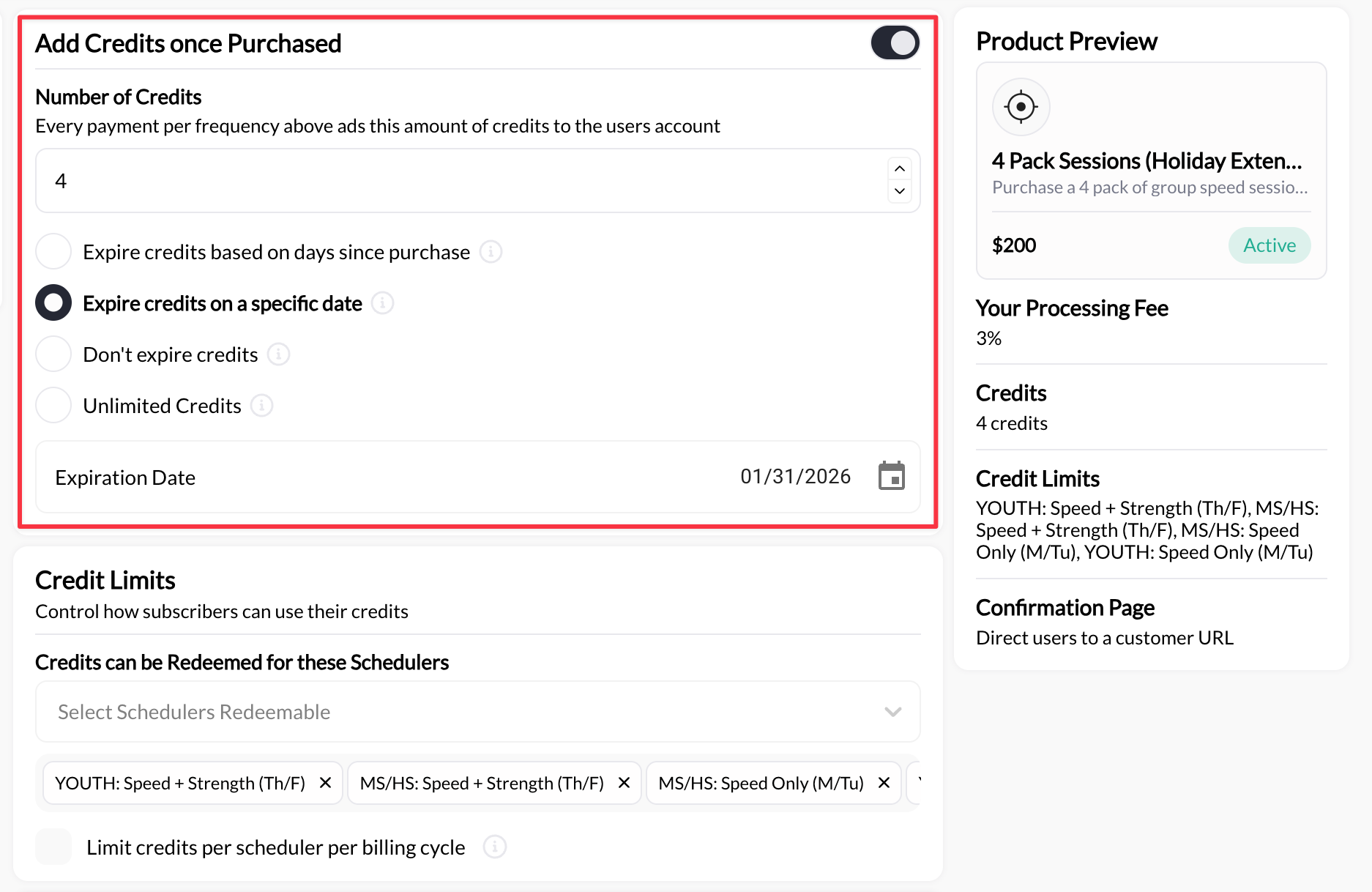
**How it works**: Single purchase, all credits issued immediately
**Example**: "10-Credit Package - \$450"
* Athlete pays \$450 once
* Receives 10 credits instantly
* Uses credits until depleted
* Purchases another package when ready
**Best for**: Pay-as-you-go coaching, flexible commitments, trial packages
**Configuration**: Create product → Enable "Add credits once purchased" → Set credit amount
 **How it works**: Recurring payment, credits issued per billing cycle
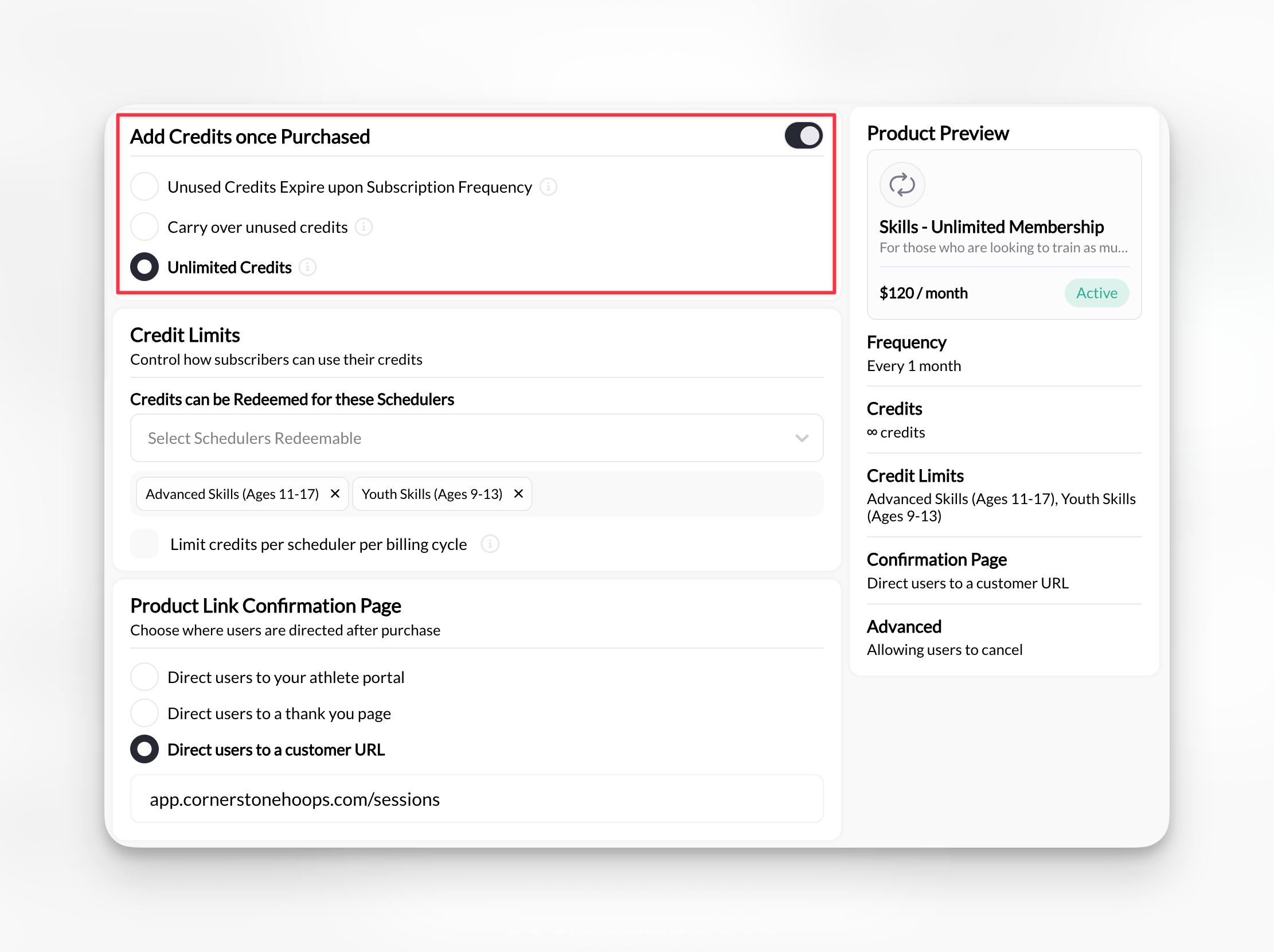
**Example**: "Monthly Membership - \$250/month (5 credits/month)"
* Athlete pays \$250 monthly
* Receives 5 fresh credits each month
* Credits may expire or roll over (your choice)
* Auto-renews as long as subscription active
**Best for**: Predictable recurring revenue, committed athletes, membership models
**Configuration**: Create subscription → Set frequency (Month/Week/Year) → Enable "Add credits once purchased" → Set credits per cycle
**Special feature**: Can set "Unlimited credits" for subscription period (displays as `∞` symbol)
**How it works**: Recurring payment, credits issued per billing cycle
**Example**: "Monthly Membership - \$250/month (5 credits/month)"
* Athlete pays \$250 monthly
* Receives 5 fresh credits each month
* Credits may expire or roll over (your choice)
* Auto-renews as long as subscription active
**Best for**: Predictable recurring revenue, committed athletes, membership models
**Configuration**: Create subscription → Set frequency (Month/Week/Year) → Enable "Add credits once purchased" → Set credits per cycle
**Special feature**: Can set "Unlimited credits" for subscription period (displays as `∞` symbol)
 **What athlete receives:**
* Credits added to their account balance immediately after purchase
* Ability to use credits when booking schedulers that accept them
* Credit balance tracked in Athlete Portal and mobile app
**Important**: You create credit-issuing products in **Payments → Products**, then configure schedulers to accept those credits in **Schedule → Schedulers**. It's a two-way linkage—both sides must be configured.
***
### Two types of credits
CoachIQ has two distinct credit types that work together:
**What they are**: Credits that can be used for ANY credit-enabled scheduler
**How they work:**
* No restrictions on which sessions they can book
* Used LAST (after scheduler-specific credits are exhausted)
* Displayed as "Master Credits" in athlete profile
**When to issue:**
* General-purpose credit packages
* Flexibility for athlete to book any service
* Simple credit system without restrictions
Note: Master credits are only added manually by admins. All other credits purchased by users will have a product specific credit bank on their account.
**Athlete sees**:
* "Master Credits: 10"
* "These credits can be used for any session and have no restrictions"
**What they are**: Credits restricted to designated schedulers only
**How they work:**
* Can ONLY be used for specific sessions you select
* Used FIRST (before master credits)
* Displayed with "Redeemable Sessions" list showing which schedulers accept them
**When to issue:**
* Membership packages for specific programs
* Tiered offerings (Basic members get Class A only, Premium get all classes)
* Revenue sharing with other coaches (restrict to their sessions)
**Configuration**: In product builder → "Redeemable Schedulers" → Select specific schedulers
**Athlete sees**:
* "5 Credit Rising Stars Membership"
* "Redeemable Sessions: Rising Stars Class (0/∞), Rising Stars Shooting Lab (0/∞)"
**Use case example**: "Elite Program Membership" grants 10 credits/month but they can only book Elite Class and Elite Shooting Labs—not your basic training sessions.
**Credit Priority System:** When athlete books a session, CoachIQ checks credits in this order:
1. **First**: Scheduler-specific credits for that particular scheduler
2. **Last**: Master credits (if scheduler-specific exhausted or don't exist)
***
### Credit-enabled schedulers
Once athletes have credits, they need schedulers configured to accept them.
**Scheduler pricing options:**
**Configuration**: Session costs 1 credit (or 2, or 3, etc.)
**Athlete requirement**: Must have credits to book (no direct payment option)
**When to use**:
* Package-deal businesses
* Want to enforce credit purchases
* Simplify booking (credits only, no payment decisions)
**Example**: "60-Min Private Training - 1 Credit"
**Configuration**: Session costs 1 credit OR \$50 direct payment
**Athlete choice**: Use credit if they have one, or pay \$50 if they don't
**When to use**:
* Offer flexibility to new athletes
* Allow drop-ins without forcing package purchase
* Maximize booking opportunities
**Example**: "60-Min Private Training - 1 Credit OR \$50"
**Best practice**: Price direct payment higher than credit-equivalent to incentivize package purchases. (1 credit = \$45 value, but direct payment = \$50)
**Configuration**: Session costs \$50 (no credit option)
**Athlete requirement**: Must pay per session
**When to use**:
* Trial/assessment sessions (don't want credits used here)
* Specialty services separate from regular training
* One-off workshops or events
**Example**: "Initial Consultation - \$75" (no credits accepted)
**Configuration**: Session is free
**No payment or credits required**
**When to use**:
* Lead magnets
* Courtesy sessions for VIP athletes
* Community events
**Example**: "Free Assessment Session"
***
### Credit balance and tracking
Athletes can see their credit balance within the **Billing** section of the athlete portal
**How to navigate as an athlete:**
1. Log into your respective athlete portal
2. Click or press the profile icon at the top right hand corner of the page
3. Visit \*\*Billing \*\*to view your credit balance
**What athlete receives:**
* Credits added to their account balance immediately after purchase
* Ability to use credits when booking schedulers that accept them
* Credit balance tracked in Athlete Portal and mobile app
**Important**: You create credit-issuing products in **Payments → Products**, then configure schedulers to accept those credits in **Schedule → Schedulers**. It's a two-way linkage—both sides must be configured.
***
### Two types of credits
CoachIQ has two distinct credit types that work together:
**What they are**: Credits that can be used for ANY credit-enabled scheduler
**How they work:**
* No restrictions on which sessions they can book
* Used LAST (after scheduler-specific credits are exhausted)
* Displayed as "Master Credits" in athlete profile
**When to issue:**
* General-purpose credit packages
* Flexibility for athlete to book any service
* Simple credit system without restrictions
Note: Master credits are only added manually by admins. All other credits purchased by users will have a product specific credit bank on their account.
**Athlete sees**:
* "Master Credits: 10"
* "These credits can be used for any session and have no restrictions"
**What they are**: Credits restricted to designated schedulers only
**How they work:**
* Can ONLY be used for specific sessions you select
* Used FIRST (before master credits)
* Displayed with "Redeemable Sessions" list showing which schedulers accept them
**When to issue:**
* Membership packages for specific programs
* Tiered offerings (Basic members get Class A only, Premium get all classes)
* Revenue sharing with other coaches (restrict to their sessions)
**Configuration**: In product builder → "Redeemable Schedulers" → Select specific schedulers
**Athlete sees**:
* "5 Credit Rising Stars Membership"
* "Redeemable Sessions: Rising Stars Class (0/∞), Rising Stars Shooting Lab (0/∞)"
**Use case example**: "Elite Program Membership" grants 10 credits/month but they can only book Elite Class and Elite Shooting Labs—not your basic training sessions.
**Credit Priority System:** When athlete books a session, CoachIQ checks credits in this order:
1. **First**: Scheduler-specific credits for that particular scheduler
2. **Last**: Master credits (if scheduler-specific exhausted or don't exist)
***
### Credit-enabled schedulers
Once athletes have credits, they need schedulers configured to accept them.
**Scheduler pricing options:**
**Configuration**: Session costs 1 credit (or 2, or 3, etc.)
**Athlete requirement**: Must have credits to book (no direct payment option)
**When to use**:
* Package-deal businesses
* Want to enforce credit purchases
* Simplify booking (credits only, no payment decisions)
**Example**: "60-Min Private Training - 1 Credit"
**Configuration**: Session costs 1 credit OR \$50 direct payment
**Athlete choice**: Use credit if they have one, or pay \$50 if they don't
**When to use**:
* Offer flexibility to new athletes
* Allow drop-ins without forcing package purchase
* Maximize booking opportunities
**Example**: "60-Min Private Training - 1 Credit OR \$50"
**Best practice**: Price direct payment higher than credit-equivalent to incentivize package purchases. (1 credit = \$45 value, but direct payment = \$50)
**Configuration**: Session costs \$50 (no credit option)
**Athlete requirement**: Must pay per session
**When to use**:
* Trial/assessment sessions (don't want credits used here)
* Specialty services separate from regular training
* One-off workshops or events
**Example**: "Initial Consultation - \$75" (no credits accepted)
**Configuration**: Session is free
**No payment or credits required**
**When to use**:
* Lead magnets
* Courtesy sessions for VIP athletes
* Community events
**Example**: "Free Assessment Session"
***
### Credit balance and tracking
Athletes can see their credit balance within the **Billing** section of the athlete portal
**How to navigate as an athlete:**
1. Log into your respective athlete portal
2. Click or press the profile icon at the top right hand corner of the page
3. Visit \*\*Billing \*\*to view your credit balance
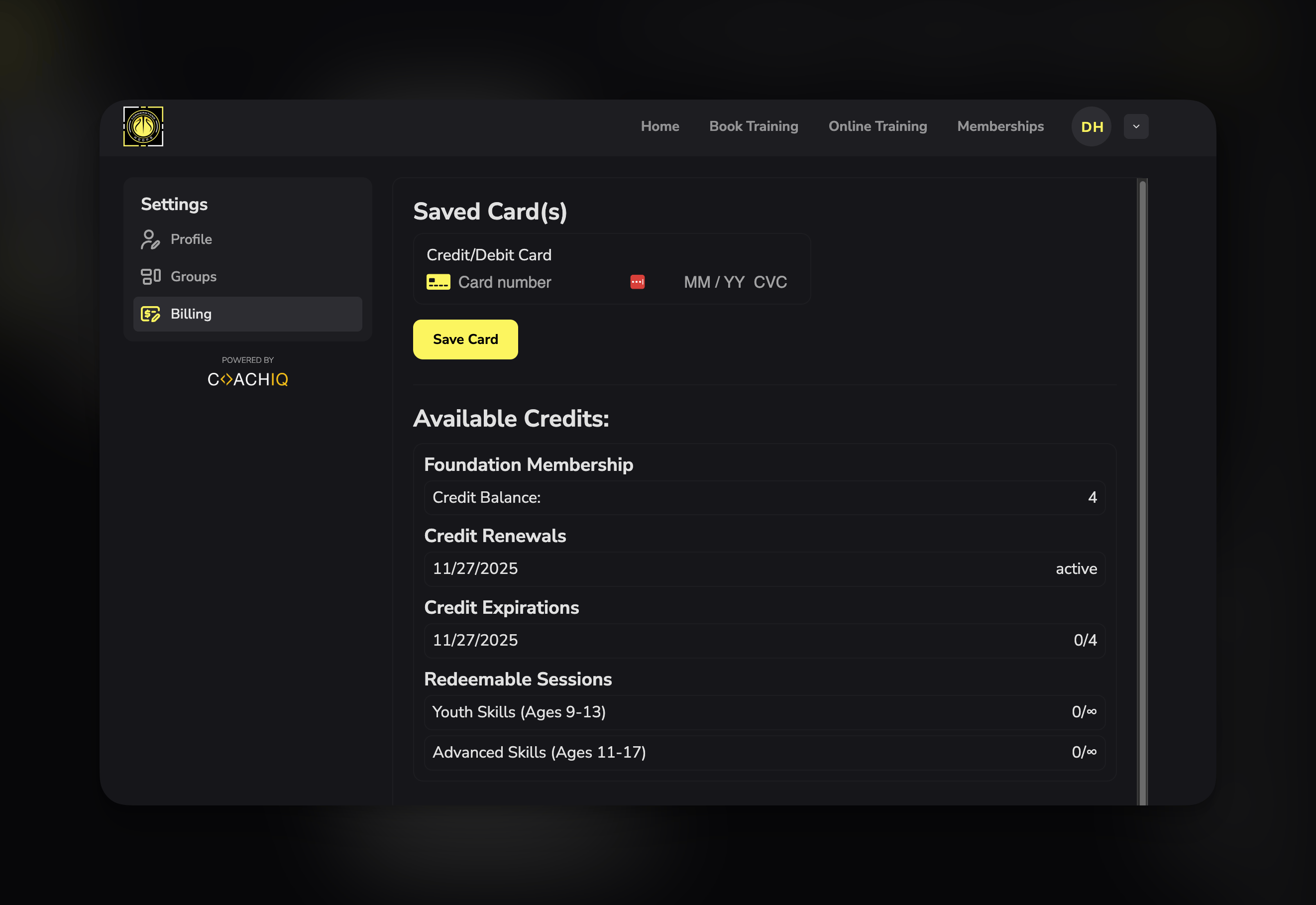 **Athlete's Billing Settings Page includes:**
Lists all active credit sources:
* "10-Credit Package" - Balance: 6 credits
* "Monthly Membership" - Balance: ∞ (unlimited this period)
* "Master Credits" - Balance: 3 credits
Shows when subscription credits renew:
* "10/18/2025 (active)"
* Indicates next billing date for credit refresh
Tracks expiring credits:
* "10/18/2025 (0/5)"
* Meaning: 0 credits expired out of 5 total issued
* Helps athletes know if they need to use credits soon
Shows which schedulers accept current credits:
* "Rising Stars Class: 0/∞" (unlimited available for this scheduler)
* "Elite Class: 0/∞" (unlimited available for this scheduler)
* "Private Sessions: 6" (6 credits available for redemption during the current billing cycle)
**Per-scheduler tracking**: Each scheduler shows individual usage if restricted credits
Active subscriptions that issue credits:
* "Monthly Rising Stars Membership - \$250/month"
* Next renewal date and status
**What coaches can see:**
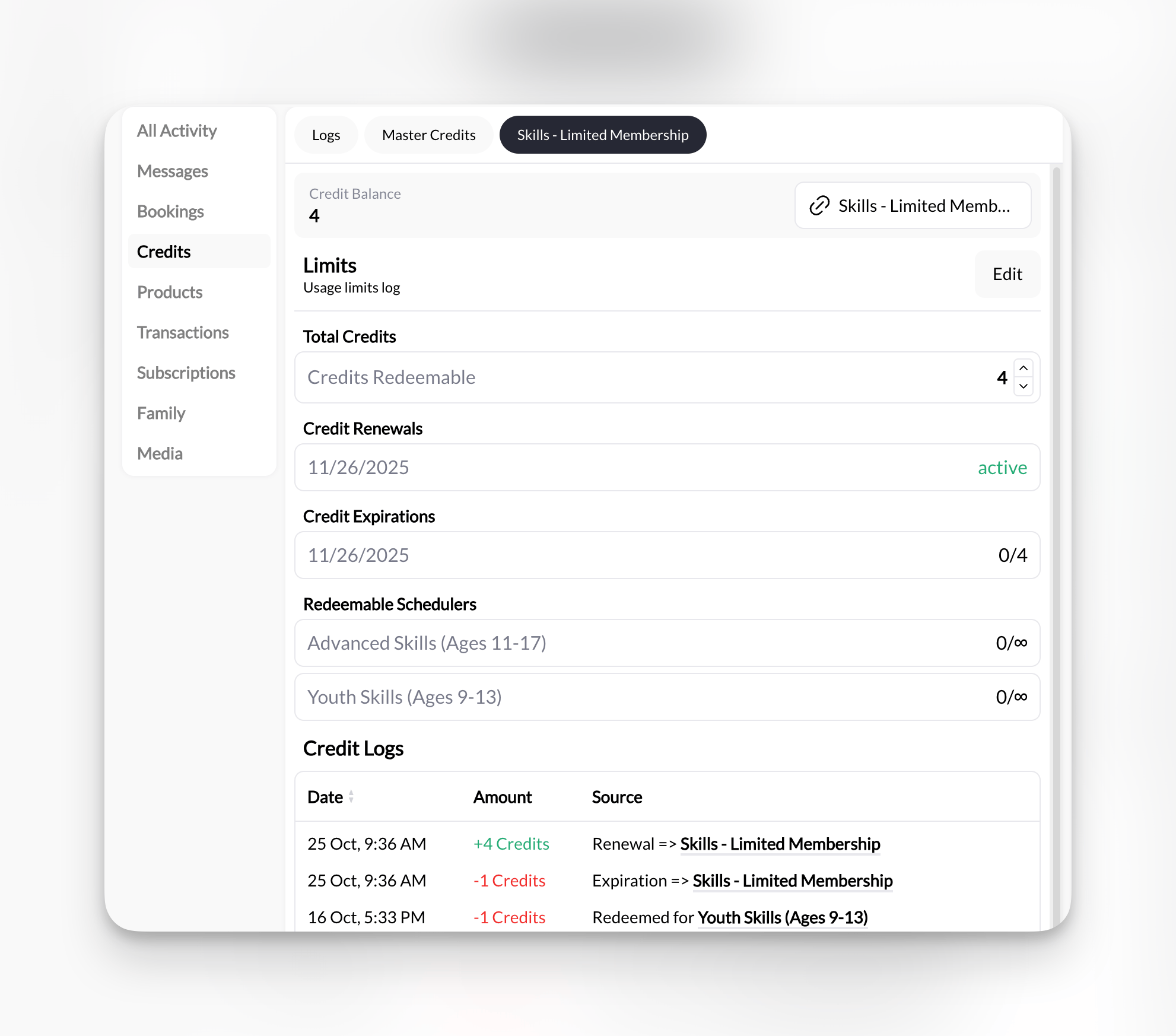
* Individual athlete credit balances (in athlete profile → Credits tab)
* Separate tabs for each credit source (Master Credits tab, product-specific tabs)
* Total credits outstanding (all athletes combined)
* Credit usage trends and analytics
* Low-balance athletes (proactive outreach opportunity)
**Athlete's Billing Settings Page includes:**
Lists all active credit sources:
* "10-Credit Package" - Balance: 6 credits
* "Monthly Membership" - Balance: ∞ (unlimited this period)
* "Master Credits" - Balance: 3 credits
Shows when subscription credits renew:
* "10/18/2025 (active)"
* Indicates next billing date for credit refresh
Tracks expiring credits:
* "10/18/2025 (0/5)"
* Meaning: 0 credits expired out of 5 total issued
* Helps athletes know if they need to use credits soon
Shows which schedulers accept current credits:
* "Rising Stars Class: 0/∞" (unlimited available for this scheduler)
* "Elite Class: 0/∞" (unlimited available for this scheduler)
* "Private Sessions: 6" (6 credits available for redemption during the current billing cycle)
**Per-scheduler tracking**: Each scheduler shows individual usage if restricted credits
Active subscriptions that issue credits:
* "Monthly Rising Stars Membership - \$250/month"
* Next renewal date and status
**What coaches can see:**
* Individual athlete credit balances (in athlete profile → Credits tab)
* Separate tabs for each credit source (Master Credits tab, product-specific tabs)
* Total credits outstanding (all athletes combined)
* Credit usage trends and analytics
* Low-balance athletes (proactive outreach opportunity)
 ### Understanding credit display notation
Athletes will see specific symbols and formats in their credit balance:
| Symbol | Meaning | Explanation |
| --------- | ---------------------------- | ---------------------------------------------------------------- |
| **`6`** | 6 finite credits | Standard credit balance—use until depleted |
| **`∞`** | Unlimited credits | Unlimited WITHIN current subscription period (resets at renewal) |
| **`3/∞`** | Used 3 of unlimited | Used 3 credits this period, unlimited remaining until renewal |
| **`0/∞`** | Scheduler-specific available | Shows per-scheduler usage for restricted credits |
| **`0/5`** | Expiration tracking | 0 credits expired out of 5 total issued |
| **`0`** | No credits remaining | Balance empty—need to purchase or wait for subscription renewal |
**Common confusion**: `∞` does NOT mean unlimited forever. It means unlimited WITHIN the current billing period. For monthly subscriptions, unlimited credits reset each month.
**Examples in context:**
**Scenario 1: One-time package**
* Athlete bought "10-Credit Package"
* Display: "Credit Balance: 6"
* Meaning: 6 credits remaining from original 10
**Scenario 2: Monthly subscription**
* Athlete has "Unlimited Monthly Membership"
* Display: "Credit Balance: ∞"
* Meaning: Can book unlimited sessions this month, resets next month
**Scenario 3: Subscription with usage**
* Athlete used 3 sessions from monthly unlimited
* Display: "Credit Balance: 3/∞"
* Meaning: Used 3 this month, unlimited remaining until renewal
**Scenario 4: Scheduler-specific credits**
* Athlete has "Rising Stars Membership"
* Display under Redeemable Sessions:
* "Rising Stars Class: 0/∞"
* "Rising Stars Shooting Lab: 0/4"
* Meaning: Unlimited bookings for Rising Stars Class and only 4 more bookings available for Rising Stars Shooting Lab this month
## Credit package strategy
### Pricing your packages
**The discount formula:**
Calculate your per-session price, then offer tiered discounts based on package size.
**Example pricing structure:**
| Package | Credits | Price | Per-Credit Cost | Discount |
| ------------------ | ------- | ------- | --------------- | -------- |
| Pay-Per-Session | N/A | \$50 | \$50.00 | 0% |
| 5-Credit Starter | 5 | \$240 | \$48.00 | 4% off |
| 10-Credit Standard | 10 | \$450 | \$45.00 | 10% off |
| 20-Credit Premium | 20 | \$850 | \$42.50 | 15% off |
| 50-Credit Elite | 50 | \$2,000 | \$40.00 | 20% off |
**Why this works:**
* Small discount for small package = low barrier to entry
* Larger discount for larger package = incentive to commit
* Pay-per-session stays highest price = drives package sales
**Sweet spot**: 10-credit packages are most popular. Price aggressively here (10-15% discount) to drive volume.
***
### Package sizing recommendations
**Best for**: New athletes, trial periods, testing your service
**Typical duration**: 2-3 weeks (2x/week training) or 1 month (1-2x/week training)
**Pricing strategy**: Small discount (5-8% off)
**Why it works**: Low commitment, easy "yes" for trying you out
**Example**: "\$240 for 5 Credits - Try before you commit!"
**Best for**: Most athletes, 1-2 month commitments
**Typical duration**: 5 weeks (2x/week) or 10 weeks (1x/week)
**Pricing strategy**: Meaningful discount (10-12% off)
**Why it works**: Enough sessions to see results, not overwhelming commitment
**Example**: "\$450 for 10 Credits - Our most popular package!"
**Recommended**: Make this your flagship package. Most coaches sell 60-70% of credits in 10-packs.
**Best for**: Committed athletes, 2-3 month programs
**Typical duration**: 10 weeks (2x/week) or 20 weeks (1x/week)
**Pricing strategy**: Strong discount (15% off)
**Why it works**: Serious commitment, positions athlete as dedicated
**Example**: "\$850 for 20 Credits - Best value for committed athletes!"
**Best for**: High-frequency athletes, predictable revenue
**Structure**: Fixed monthly fee, set number of credits per month (e.g., \$400/month = 12 credits)
**Pricing strategy**: Significant savings for frequent athletes
**Why it works**: Predictable recurring revenue, athlete locks in
**Example**: "\$400/month Unlimited - 12 Credits/month (up to 3x/week)"
See [Subscription Scheduling](/scheduling/recurring-credit-memberships) for full details.
***
## Advanced credit concepts
### Credit expiration
**Should credits expire?** Depends on your business model.
**Policy**: Credits never expire
**Benefits**:
* Athlete-friendly, removes pressure
* Simpler to manage
* No refund disputes
* Better for seasonal athletes (ski coaches, summer camps)
**Drawback**: Athletes might not use credits for months/years
**Best for**: Building goodwill, long-term athlete relationships
**Policy**: Credits expire days or months after pruchase
**Benefits**:
* Encourages regular training
* Prevents "credit hoarders"
* Aligns with typical program lengths
**Communication required**: Clear expiration warnings at purchase and via email
**Best for**: High-frequency training businesses, regular weekly schedules
**Legal note**: Some jurisdictions have laws about stored value/gift card expiration. Check local regulations before setting expiration policies.
***
### Credit refunds and transfers
**Common scenarios:**
**Your options:**
1. **Full refund**: Return unused credits as money (minus transaction fees)
2. **Partial refund**: Refund minus a processing/admin fee
3. **No refunds**: Credits are final sale (most common)
4. **Credit freeze**: Pause expiration for athlete on extended break
**Recommended policy**: "No refunds on credit packages, but credits never expire and can be gifted to others."
**Why**: Protects your cash flow, maintains simplicity
**Your options:**
1. **Allow transfers**: Build goodwill, potential new athlete acquisition
2. **No transfers**: Protect against credit resale market
3. **Conditional transfers**: Allow with admin fee or approval
**Recommended**: Allow transfers with coach approval—turns athletes into referral sources.
**Standard practice**: Refund credit back to athlete's balance
**System should handle automatically**: CoachIQ refunds credits when coach cancels
**No cash refund needed**: Credit goes back into athlete's account for future use
***
### Multi-credit sessions
**When to use multiple credits per session:**
✅ **Longer sessions**: 90-min session = 1.5 credits or 2 credits\
✅ **Premium services**: Video analysis session = 2 credits\
✅ **Group training value**: Small group (max 4) = 1 credit, but individual value maintained\
✅ **Specialty add-ons**: Nutrition consult = 0.5 credits
**Configuration in CoachIQ:**
* Set scheduler to require 2 credits (or 1.5, 0.5, etc.)
* System automatically deducts correct amount at booking
* Athlete sees credit cost before confirming
**Example tiered structure:**
* 30-min session = 0.5 credits
* 60-min session = 1 credit
* 90-min session = 1.5 credits
* 120-min intensive = 2 credits
***
### Credit-based vs subscription scheduling
**Understanding the difference:**
| Feature | Credit Packages | Subscriptions |
| ----------------------- | -------------------------- | ------------------------------------------ |
| **Payment** | One-time upfront | Recurring monthly |
| **Credit delivery** | All at once | Monthly allotment |
| **Athlete flexibility** | Use anytime until depleted | Use within month or lose |
| **Revenue model** | Lumpy (package purchases) | Predictable (monthly) |
| **Commitment level** | Medium (10-20 sessions) | High (ongoing monthly) |
| **Best for** | Most coaches | Established businesses with loyal athletes |
**Can combine both**: Offer packages for some athletes, subscriptions for others.
See [Subscription Scheduling](/scheduling/recurring-credit-memberships) for full comparison.
***
## Credit system best practices
**First 3 months**: Offer just TWO packages:
* 5-Credit Starter (\$240)
* 10-Credit Standard (\$450)
**Why**: Test demand, keep operations simple, learn pricing
**Expand later**: Add larger packages once you understand athlete buying patterns
**Make packages clearly better** than pay-per-session:
* 10% discount minimum
* 15-20% for large packages
**Psychology**: Athlete should feel "stupid" not buying package if they'll train regularly
**Example**: 50/session vs 450/10-pack (45/session) = 50 savings
**At every touchpoint**, remind athletes of credit value:
* "You're saving \$5 per session with your package!"
* "9 credits remaining—book your next session!"
* "Low balance alert—buy now and save!"
**Result**: Reinforces smart purchase decision, encourages renewals
**Monitor monthly**:
* Credits sold (how much cash came in)
* Credits used (how many sessions delivered)
* Outstanding credit liability (credits sold but not used)
**Goal**: Credits sold ≥ credits used = healthy cash flow
**Warning sign**: Credits used > credits sold = burning through old sales
**Back-to-school (Sept)**: Offer bonus credits (buy 10, get 1 free)
**New Year (Jan)**: Promote 20-packs for "commitment month"
**Summer slowdown**: Offer "no expiration" messaging to keep summer credits
**Result**: Maintain cash flow during seasonal dips
***
## Common questions
**System behavior**: CoachIQ prevents booking if insufficient credits
**Athlete sees (if credit renewal link is enabled)**: "Add more credits"
**Your action**: None required (system handles automatically)
**Yes!** This is the "hybrid" model.
**Configuration**: Set scheduler to accept "1 Credit OR \$50"
**Athlete experience**: Chooses payment method at booking time
**Why do this**: Flexibility for new athletes, while incentivizing packages for regulars
**Important**: If a client is only on recurring booking then credits are not needed. Simply collect their payment with a one time or monthly product and create their recurring booking.
See [Recurring Bookings](/scheduling/recurring-bookings) for full details.
**Your policy decision**:
**Option 1**: No sharing (default)—each athlete has their own credit balance
**Option 2**: Family/couple accounts—allow credit sharing among linked accounts
**CoachIQ default**: Individual credit balances per athlete
**Workaround for sharing**: Create "family package" product that grants credits to multiple athlete accounts
**Financially**: This is your profit margin buffer
**Explanation**: Some unused credits offset administrative costs, marketing, and credit card fees
**Typical unused rate**: 10-20% of credits go unused (industry standard)
**To minimize**:
* Send re-engagement campaigns to inactive athletes
* Offer credit transfer to friends
* Allow gifting unused credits
* No expiration policy keeps athletes willing to return later
**Master Credits:**
* Added manually by an admin/coach
* Universal—can be used for any credit-enabled scheduler
* Used LAST (after scheduler-specific credits exhausted)
**Product Bank Credits**
* Credits that are added when a user makes a product purchase (one time or subscription)
* Non Scheduler Specifc: Universal—can be used for any credit-enabled scheduler
* Scheduler Specific: Restricted to designated schedulers only
* Used FIRST (priority over master credits)
* Great for tiered memberships and program-specific packages
***
## Decision guide: Should you use credits?
**Your business has these traits:**
✅ You want upfront cash flow\
✅ You want clients to be able to book their own sessions\
✅ You offer packages or programs (not just drop-ins)\
✅ Athletes train regularly (2+ times per month)\
✅ You want higher commitment from athletes\
✅ You're comfortable with package sales conversations\
✅ You can handle some administrative overhead (credit tracking)
**Athlete types that love credits:**
* Committed long-term athletes
* Athletes on structured programs
* Those who value convenience
* Package/deal shoppers
**Verdict**: Credits will improve your business metrics
**Your business has these traits:**
❌ You offer an inconsistent training schedule (no facility, rotating gym schedule)\
❌ Athletes train inconsistently\
❌ Athletes train the same time each week (use recurring booking alongside monthly subscription)\
❌ Your athletes are very transient (tourists, travelers)\
❌ You're just starting out and want to test demand first
**Athlete types that struggle with credits:**
* Drop-in athletes
* Tourists/travelers (won't use credits)
* Those with unpredictable schedules
**Verdict**: Start with direct payment, add credits later if needed
**Best of both worlds:**
✅ Offer credit packages for committed athletes\
✅ Allow direct payment for casual/new athletes\
✅ Price direct payment higher to incentivize packages\
✅ Transition athletes from pay-per-session → packages over time
**Implementation:**
1. Start all new athletes on direct payment (try you out)
2. After 4-6 sessions, offer credit package as "better value"
3. Frame it as reward for their commitment
4. Gradually shift athlete base toward packages
**Verdict**: Recommended for most coaches—flexibility + revenue optimization
***
## Related articles
Step-by-step guide to creating credit products.
View balances, grant credits manually, track usage, handle refunds
Advanced restrictions and scheduling limits for credit-based sessions
Set up bookable sessions that accept credits
How to manually book athletes using their credit balance
***
**You now understand**: What credits are, why they benefit your business, how they work in CoachIQ, the two credit types (Master vs Scheduler-Specific), and whether they're right for your coaching model.
**Ready to implement credits?** Continue to Article #24 for step-by-step setup instructions, or contact support for personalized credit strategy consultation. [Contact Support](https://support.coachiq.com)
### Understanding credit display notation
Athletes will see specific symbols and formats in their credit balance:
| Symbol | Meaning | Explanation |
| --------- | ---------------------------- | ---------------------------------------------------------------- |
| **`6`** | 6 finite credits | Standard credit balance—use until depleted |
| **`∞`** | Unlimited credits | Unlimited WITHIN current subscription period (resets at renewal) |
| **`3/∞`** | Used 3 of unlimited | Used 3 credits this period, unlimited remaining until renewal |
| **`0/∞`** | Scheduler-specific available | Shows per-scheduler usage for restricted credits |
| **`0/5`** | Expiration tracking | 0 credits expired out of 5 total issued |
| **`0`** | No credits remaining | Balance empty—need to purchase or wait for subscription renewal |
**Common confusion**: `∞` does NOT mean unlimited forever. It means unlimited WITHIN the current billing period. For monthly subscriptions, unlimited credits reset each month.
**Examples in context:**
**Scenario 1: One-time package**
* Athlete bought "10-Credit Package"
* Display: "Credit Balance: 6"
* Meaning: 6 credits remaining from original 10
**Scenario 2: Monthly subscription**
* Athlete has "Unlimited Monthly Membership"
* Display: "Credit Balance: ∞"
* Meaning: Can book unlimited sessions this month, resets next month
**Scenario 3: Subscription with usage**
* Athlete used 3 sessions from monthly unlimited
* Display: "Credit Balance: 3/∞"
* Meaning: Used 3 this month, unlimited remaining until renewal
**Scenario 4: Scheduler-specific credits**
* Athlete has "Rising Stars Membership"
* Display under Redeemable Sessions:
* "Rising Stars Class: 0/∞"
* "Rising Stars Shooting Lab: 0/4"
* Meaning: Unlimited bookings for Rising Stars Class and only 4 more bookings available for Rising Stars Shooting Lab this month
## Credit package strategy
### Pricing your packages
**The discount formula:**
Calculate your per-session price, then offer tiered discounts based on package size.
**Example pricing structure:**
| Package | Credits | Price | Per-Credit Cost | Discount |
| ------------------ | ------- | ------- | --------------- | -------- |
| Pay-Per-Session | N/A | \$50 | \$50.00 | 0% |
| 5-Credit Starter | 5 | \$240 | \$48.00 | 4% off |
| 10-Credit Standard | 10 | \$450 | \$45.00 | 10% off |
| 20-Credit Premium | 20 | \$850 | \$42.50 | 15% off |
| 50-Credit Elite | 50 | \$2,000 | \$40.00 | 20% off |
**Why this works:**
* Small discount for small package = low barrier to entry
* Larger discount for larger package = incentive to commit
* Pay-per-session stays highest price = drives package sales
**Sweet spot**: 10-credit packages are most popular. Price aggressively here (10-15% discount) to drive volume.
***
### Package sizing recommendations
**Best for**: New athletes, trial periods, testing your service
**Typical duration**: 2-3 weeks (2x/week training) or 1 month (1-2x/week training)
**Pricing strategy**: Small discount (5-8% off)
**Why it works**: Low commitment, easy "yes" for trying you out
**Example**: "\$240 for 5 Credits - Try before you commit!"
**Best for**: Most athletes, 1-2 month commitments
**Typical duration**: 5 weeks (2x/week) or 10 weeks (1x/week)
**Pricing strategy**: Meaningful discount (10-12% off)
**Why it works**: Enough sessions to see results, not overwhelming commitment
**Example**: "\$450 for 10 Credits - Our most popular package!"
**Recommended**: Make this your flagship package. Most coaches sell 60-70% of credits in 10-packs.
**Best for**: Committed athletes, 2-3 month programs
**Typical duration**: 10 weeks (2x/week) or 20 weeks (1x/week)
**Pricing strategy**: Strong discount (15% off)
**Why it works**: Serious commitment, positions athlete as dedicated
**Example**: "\$850 for 20 Credits - Best value for committed athletes!"
**Best for**: High-frequency athletes, predictable revenue
**Structure**: Fixed monthly fee, set number of credits per month (e.g., \$400/month = 12 credits)
**Pricing strategy**: Significant savings for frequent athletes
**Why it works**: Predictable recurring revenue, athlete locks in
**Example**: "\$400/month Unlimited - 12 Credits/month (up to 3x/week)"
See [Subscription Scheduling](/scheduling/recurring-credit-memberships) for full details.
***
## Advanced credit concepts
### Credit expiration
**Should credits expire?** Depends on your business model.
**Policy**: Credits never expire
**Benefits**:
* Athlete-friendly, removes pressure
* Simpler to manage
* No refund disputes
* Better for seasonal athletes (ski coaches, summer camps)
**Drawback**: Athletes might not use credits for months/years
**Best for**: Building goodwill, long-term athlete relationships
**Policy**: Credits expire days or months after pruchase
**Benefits**:
* Encourages regular training
* Prevents "credit hoarders"
* Aligns with typical program lengths
**Communication required**: Clear expiration warnings at purchase and via email
**Best for**: High-frequency training businesses, regular weekly schedules
**Legal note**: Some jurisdictions have laws about stored value/gift card expiration. Check local regulations before setting expiration policies.
***
### Credit refunds and transfers
**Common scenarios:**
**Your options:**
1. **Full refund**: Return unused credits as money (minus transaction fees)
2. **Partial refund**: Refund minus a processing/admin fee
3. **No refunds**: Credits are final sale (most common)
4. **Credit freeze**: Pause expiration for athlete on extended break
**Recommended policy**: "No refunds on credit packages, but credits never expire and can be gifted to others."
**Why**: Protects your cash flow, maintains simplicity
**Your options:**
1. **Allow transfers**: Build goodwill, potential new athlete acquisition
2. **No transfers**: Protect against credit resale market
3. **Conditional transfers**: Allow with admin fee or approval
**Recommended**: Allow transfers with coach approval—turns athletes into referral sources.
**Standard practice**: Refund credit back to athlete's balance
**System should handle automatically**: CoachIQ refunds credits when coach cancels
**No cash refund needed**: Credit goes back into athlete's account for future use
***
### Multi-credit sessions
**When to use multiple credits per session:**
✅ **Longer sessions**: 90-min session = 1.5 credits or 2 credits\
✅ **Premium services**: Video analysis session = 2 credits\
✅ **Group training value**: Small group (max 4) = 1 credit, but individual value maintained\
✅ **Specialty add-ons**: Nutrition consult = 0.5 credits
**Configuration in CoachIQ:**
* Set scheduler to require 2 credits (or 1.5, 0.5, etc.)
* System automatically deducts correct amount at booking
* Athlete sees credit cost before confirming
**Example tiered structure:**
* 30-min session = 0.5 credits
* 60-min session = 1 credit
* 90-min session = 1.5 credits
* 120-min intensive = 2 credits
***
### Credit-based vs subscription scheduling
**Understanding the difference:**
| Feature | Credit Packages | Subscriptions |
| ----------------------- | -------------------------- | ------------------------------------------ |
| **Payment** | One-time upfront | Recurring monthly |
| **Credit delivery** | All at once | Monthly allotment |
| **Athlete flexibility** | Use anytime until depleted | Use within month or lose |
| **Revenue model** | Lumpy (package purchases) | Predictable (monthly) |
| **Commitment level** | Medium (10-20 sessions) | High (ongoing monthly) |
| **Best for** | Most coaches | Established businesses with loyal athletes |
**Can combine both**: Offer packages for some athletes, subscriptions for others.
See [Subscription Scheduling](/scheduling/recurring-credit-memberships) for full comparison.
***
## Credit system best practices
**First 3 months**: Offer just TWO packages:
* 5-Credit Starter (\$240)
* 10-Credit Standard (\$450)
**Why**: Test demand, keep operations simple, learn pricing
**Expand later**: Add larger packages once you understand athlete buying patterns
**Make packages clearly better** than pay-per-session:
* 10% discount minimum
* 15-20% for large packages
**Psychology**: Athlete should feel "stupid" not buying package if they'll train regularly
**Example**: 50/session vs 450/10-pack (45/session) = 50 savings
**At every touchpoint**, remind athletes of credit value:
* "You're saving \$5 per session with your package!"
* "9 credits remaining—book your next session!"
* "Low balance alert—buy now and save!"
**Result**: Reinforces smart purchase decision, encourages renewals
**Monitor monthly**:
* Credits sold (how much cash came in)
* Credits used (how many sessions delivered)
* Outstanding credit liability (credits sold but not used)
**Goal**: Credits sold ≥ credits used = healthy cash flow
**Warning sign**: Credits used > credits sold = burning through old sales
**Back-to-school (Sept)**: Offer bonus credits (buy 10, get 1 free)
**New Year (Jan)**: Promote 20-packs for "commitment month"
**Summer slowdown**: Offer "no expiration" messaging to keep summer credits
**Result**: Maintain cash flow during seasonal dips
***
## Common questions
**System behavior**: CoachIQ prevents booking if insufficient credits
**Athlete sees (if credit renewal link is enabled)**: "Add more credits"
**Your action**: None required (system handles automatically)
**Yes!** This is the "hybrid" model.
**Configuration**: Set scheduler to accept "1 Credit OR \$50"
**Athlete experience**: Chooses payment method at booking time
**Why do this**: Flexibility for new athletes, while incentivizing packages for regulars
**Important**: If a client is only on recurring booking then credits are not needed. Simply collect their payment with a one time or monthly product and create their recurring booking.
See [Recurring Bookings](/scheduling/recurring-bookings) for full details.
**Your policy decision**:
**Option 1**: No sharing (default)—each athlete has their own credit balance
**Option 2**: Family/couple accounts—allow credit sharing among linked accounts
**CoachIQ default**: Individual credit balances per athlete
**Workaround for sharing**: Create "family package" product that grants credits to multiple athlete accounts
**Financially**: This is your profit margin buffer
**Explanation**: Some unused credits offset administrative costs, marketing, and credit card fees
**Typical unused rate**: 10-20% of credits go unused (industry standard)
**To minimize**:
* Send re-engagement campaigns to inactive athletes
* Offer credit transfer to friends
* Allow gifting unused credits
* No expiration policy keeps athletes willing to return later
**Master Credits:**
* Added manually by an admin/coach
* Universal—can be used for any credit-enabled scheduler
* Used LAST (after scheduler-specific credits exhausted)
**Product Bank Credits**
* Credits that are added when a user makes a product purchase (one time or subscription)
* Non Scheduler Specifc: Universal—can be used for any credit-enabled scheduler
* Scheduler Specific: Restricted to designated schedulers only
* Used FIRST (priority over master credits)
* Great for tiered memberships and program-specific packages
***
## Decision guide: Should you use credits?
**Your business has these traits:**
✅ You want upfront cash flow\
✅ You want clients to be able to book their own sessions\
✅ You offer packages or programs (not just drop-ins)\
✅ Athletes train regularly (2+ times per month)\
✅ You want higher commitment from athletes\
✅ You're comfortable with package sales conversations\
✅ You can handle some administrative overhead (credit tracking)
**Athlete types that love credits:**
* Committed long-term athletes
* Athletes on structured programs
* Those who value convenience
* Package/deal shoppers
**Verdict**: Credits will improve your business metrics
**Your business has these traits:**
❌ You offer an inconsistent training schedule (no facility, rotating gym schedule)\
❌ Athletes train inconsistently\
❌ Athletes train the same time each week (use recurring booking alongside monthly subscription)\
❌ Your athletes are very transient (tourists, travelers)\
❌ You're just starting out and want to test demand first
**Athlete types that struggle with credits:**
* Drop-in athletes
* Tourists/travelers (won't use credits)
* Those with unpredictable schedules
**Verdict**: Start with direct payment, add credits later if needed
**Best of both worlds:**
✅ Offer credit packages for committed athletes\
✅ Allow direct payment for casual/new athletes\
✅ Price direct payment higher to incentivize packages\
✅ Transition athletes from pay-per-session → packages over time
**Implementation:**
1. Start all new athletes on direct payment (try you out)
2. After 4-6 sessions, offer credit package as "better value"
3. Frame it as reward for their commitment
4. Gradually shift athlete base toward packages
**Verdict**: Recommended for most coaches—flexibility + revenue optimization
***
## Related articles
Step-by-step guide to creating credit products.
View balances, grant credits manually, track usage, handle refunds
Advanced restrictions and scheduling limits for credit-based sessions
Set up bookable sessions that accept credits
How to manually book athletes using their credit balance
***
**You now understand**: What credits are, why they benefit your business, how they work in CoachIQ, the two credit types (Master vs Scheduler-Specific), and whether they're right for your coaching model.
**Ready to implement credits?** Continue to Article #24 for step-by-step setup instructions, or contact support for personalized credit strategy consultation. [Contact Support](https://support.coachiq.com)