> ## Documentation Index
> Fetch the complete documentation index at: https://help.coachiq.io/llms.txt
> Use this file to discover all available pages before exploring further.
# Booking for Multiple Athletes (Family Accounts)
> Enable parents to book multiple sessions for their children using a single account and shared credit balance
**Where to find this**: Schedule → Schedulers → \[Select Scheduler] → Settings → Permission(s)
## What you'll accomplish
Set up your schedulers to allow parents to book sessions for multiple children from a single account. This is ideal for families with 2-3+ kids who all train with you—one parent manages everything from one account.
**Success criteria**: A parent with 10 credits can book 3 sessions (one for each child) on the same day, using 3 credits from their shared balance.
***
## How family booking works in CoachIQ
CoachIQ uses a **single-account model** for families:
* **One parent account** holds all credits and subscriptions
* **Parent books sessions** for each child as needed
* **Credits deduct** from the shared family balance
* **No per-child limits**—booking is only limited by available credits
**Current limitation**: There's no built-in field to indicate which child each booking is for. Parents simply book multiple slots, and you'll see "Parent Name" on each booking. Coordinate with families on who's attending which session.
***
## Enable multiple bookings per timeslot
By default, users can only book a timeslot once. To allow families to book the same slot multiple times (one per child), enable this setting:
Go to **Schedule** → **Schedulers** → click on the scheduler you want to configure.
In the scheduler builder, click **Settings** in the left sidebar.
Scroll to the **Permission(s)** section and check **"Allow athletes to book a timeslot more than once"**.
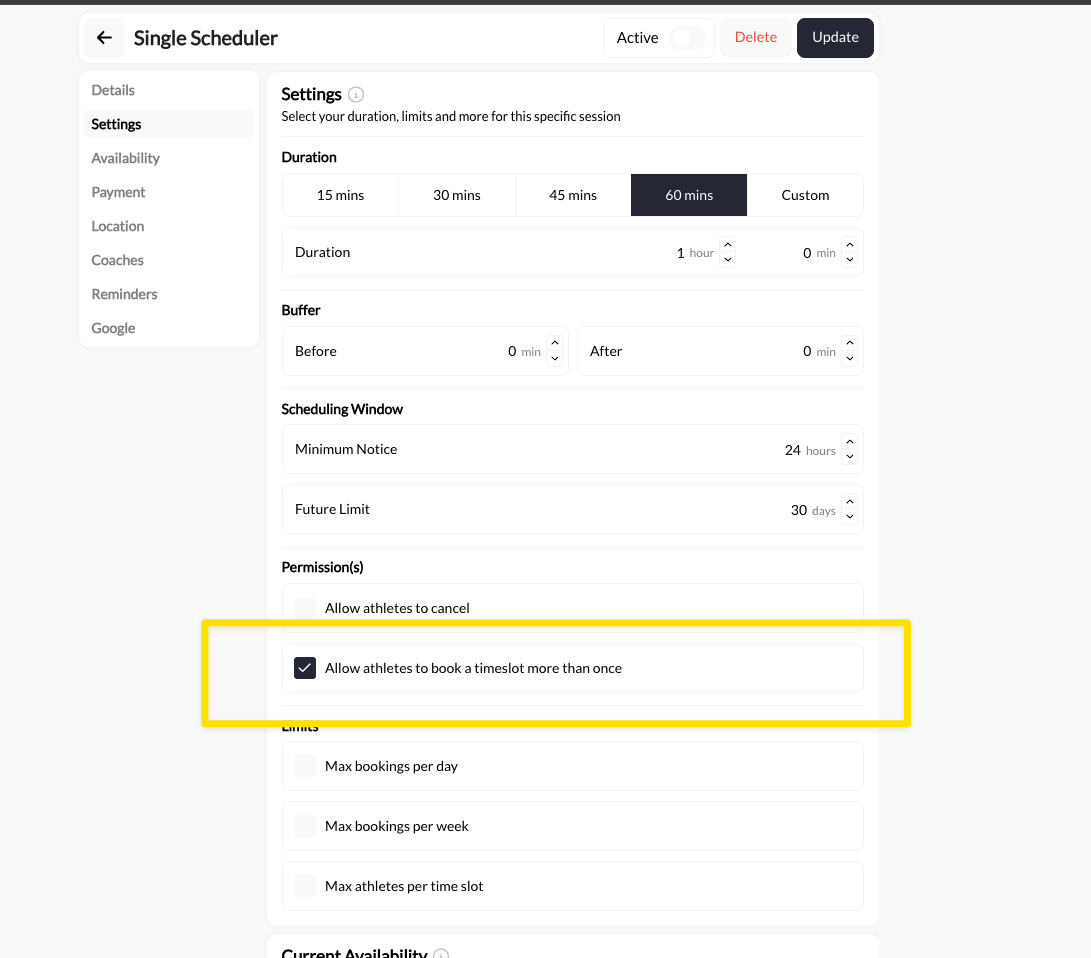 This setting is per-scheduler. Enable it on schedulers where families commonly book multiple kids (group classes, camps, clinics) and leave it off for 1-on-1 private sessions if needed.
Click **Update** to save the scheduler settings.
***
## The parent booking experience
Here's what parents see when booking for multiple children:
The parent uses their email and password to access the athlete portal or your website.
They see your schedulers with credit costs displayed (e.g., "1 Credit" per session).
This setting is per-scheduler. Enable it on schedulers where families commonly book multiple kids (group classes, camps, clinics) and leave it off for 1-on-1 private sessions if needed.
Click **Update** to save the scheduler settings.
***
## The parent booking experience
Here's what parents see when booking for multiple children:
The parent uses their email and password to access the athlete portal or your website.
They see your schedulers with credit costs displayed (e.g., "1 Credit" per session).
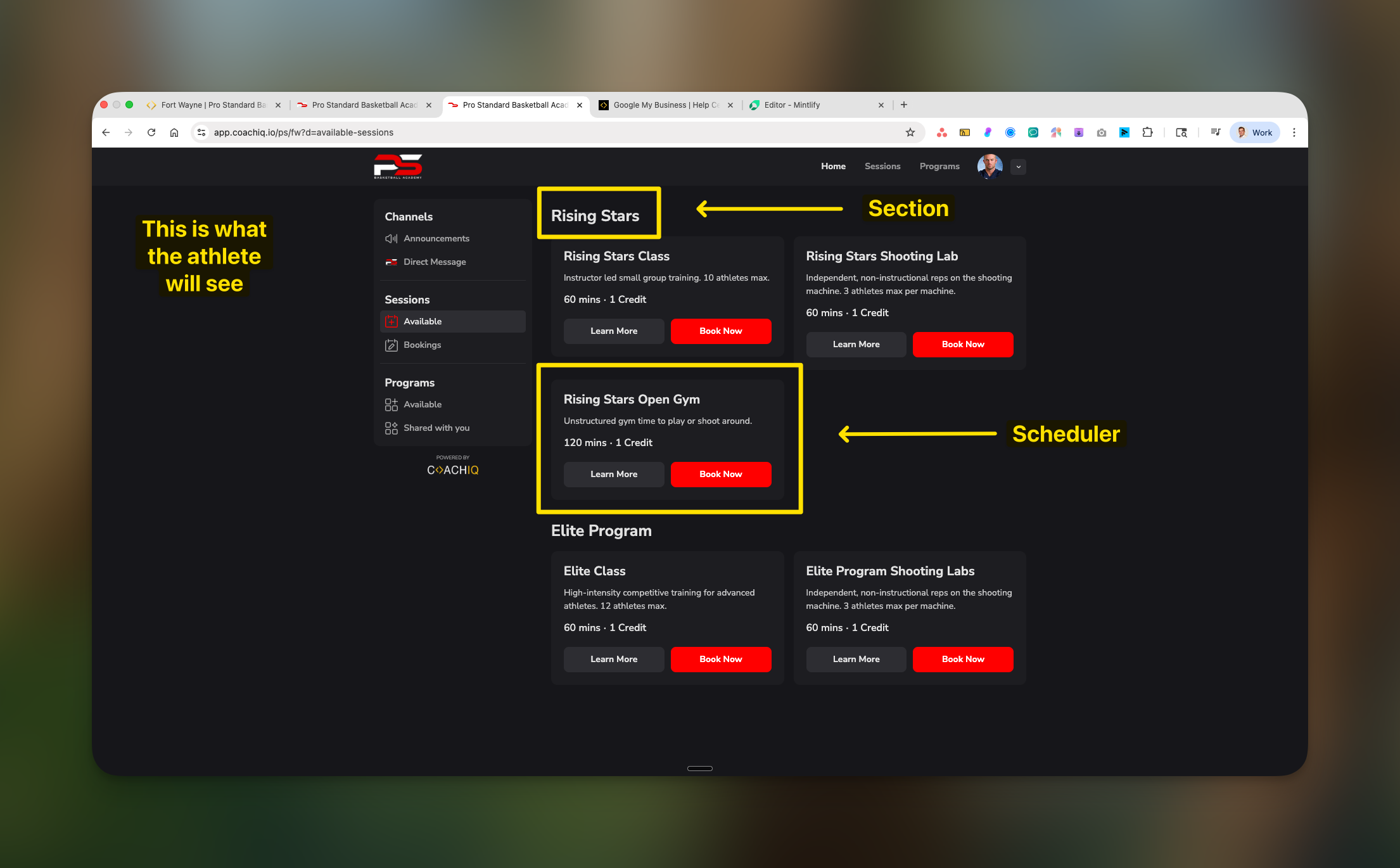 They select a timeslot and book using credits. One credit is deducted.
They return to the same timeslot and book again. Another credit is deducted.
**With the permission enabled**: The system allows this second booking.
**Without the permission**: The system would block them with "You've already booked this slot."
Parent continues booking until all children are registered. Credits deduct from their single balance with each booking.
***
## Setting up families for success
### Recommended product setup
Create credit packages sized for families:
| Package | Credits | Best For |
| -------------- | ------------- | ----------------------------------------- |
| Single Athlete | 4-8 credits | One child training weekly |
| Family Pack | 12-16 credits | 2 children training weekly |
| Large Family | 20-24 credits | 3+ children or multiple sessions per week |
**Pricing strategy**: Offer a slight discount on larger packages to incentivize families to purchase upfront. A "Family Pack" at $400 for 16 credits (vs. $200 for 8) rewards their commitment.
### Communicate the workflow
Many parents expect separate accounts for each child. Set expectations upfront:
**In your onboarding or welcome message:**
> "Families with multiple athletes: Create ONE parent account. Purchase a credit package, then book sessions for each child from that single account. Your credits are shared across all your children."
**On your registration form:**
Consider adding a field asking "How many athletes in your household?" to identify family accounts early.
***
## Managing family bookings as a coach
### Identifying which child is attending
Since bookings show the parent's name, use these strategies:
When you see a family has booked multiple slots, add a note to each booking indicating which child:
* Open the booking on your calendar
* Add a note: "Johnny (8th grade)" or "Sarah (6th grade)"
* This helps at check-in time
For group sessions, simply ask "Which \[Last Name] kid is here today?" at check-in. Most coaches find this quick and natural.
Add tags to the parent's profile listing their children:
* Tag: "Parent of Johnny, Sarah, Mike"
* Quick reference when viewing their bookings
For families with 3+ kids, keep a simple reference:
| Parent Account | Children |
| -------------- | --------------------------------- |
| Smith Family | Johnny (14), Sarah (12), Mike (9) |
| Johnson Family | Emma (15), Liam (13) |
### Viewing family credit balances
To see how many credits a family has remaining:
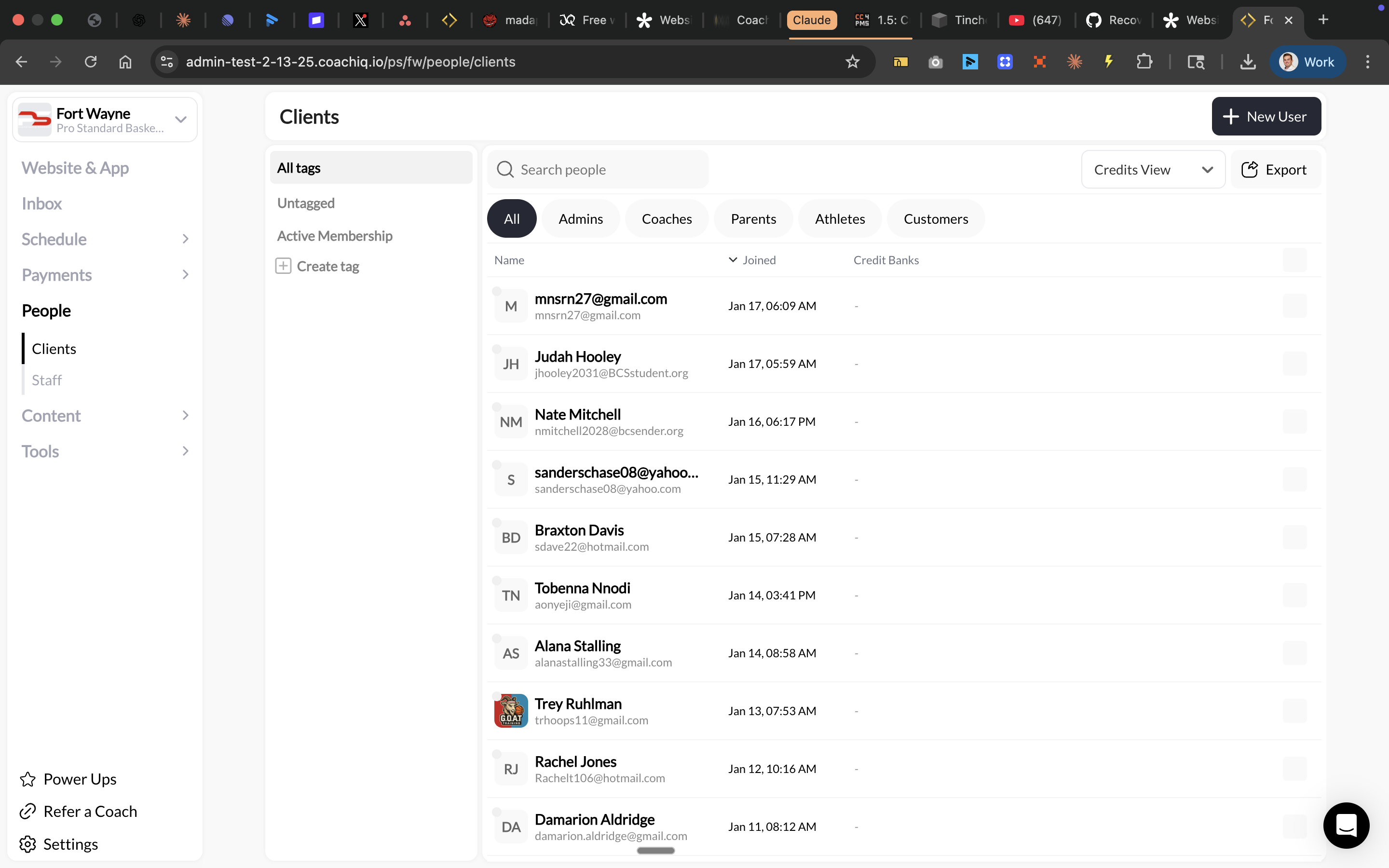
1. Go to **People** → **Clients**
2. Switch to **Credits View** (top right dropdown)
3. Find the parent's account
4. View their credit bank balance
They select a timeslot and book using credits. One credit is deducted.
They return to the same timeslot and book again. Another credit is deducted.
**With the permission enabled**: The system allows this second booking.
**Without the permission**: The system would block them with "You've already booked this slot."
Parent continues booking until all children are registered. Credits deduct from their single balance with each booking.
***
## Setting up families for success
### Recommended product setup
Create credit packages sized for families:
| Package | Credits | Best For |
| -------------- | ------------- | ----------------------------------------- |
| Single Athlete | 4-8 credits | One child training weekly |
| Family Pack | 12-16 credits | 2 children training weekly |
| Large Family | 20-24 credits | 3+ children or multiple sessions per week |
**Pricing strategy**: Offer a slight discount on larger packages to incentivize families to purchase upfront. A "Family Pack" at $400 for 16 credits (vs. $200 for 8) rewards their commitment.
### Communicate the workflow
Many parents expect separate accounts for each child. Set expectations upfront:
**In your onboarding or welcome message:**
> "Families with multiple athletes: Create ONE parent account. Purchase a credit package, then book sessions for each child from that single account. Your credits are shared across all your children."
**On your registration form:**
Consider adding a field asking "How many athletes in your household?" to identify family accounts early.
***
## Managing family bookings as a coach
### Identifying which child is attending
Since bookings show the parent's name, use these strategies:
When you see a family has booked multiple slots, add a note to each booking indicating which child:
* Open the booking on your calendar
* Add a note: "Johnny (8th grade)" or "Sarah (6th grade)"
* This helps at check-in time
For group sessions, simply ask "Which \[Last Name] kid is here today?" at check-in. Most coaches find this quick and natural.
Add tags to the parent's profile listing their children:
* Tag: "Parent of Johnny, Sarah, Mike"
* Quick reference when viewing their bookings
For families with 3+ kids, keep a simple reference:
| Parent Account | Children |
| -------------- | --------------------------------- |
| Smith Family | Johnny (14), Sarah (12), Mike (9) |
| Johnson Family | Emma (15), Liam (13) |
### Viewing family credit balances
To see how many credits a family has remaining:
1. Go to **People** → **Clients**
2. Switch to **Credits View** (top right dropdown)
3. Find the parent's account
4. View their credit bank balance
 ***
## Common family booking scenarios
**Solution**: With the permission enabled, they book the same timeslot 3 times. Each booking deducts 1 credit (or whatever your scheduler costs).
**What you'll see**: 3 bookings from "Parent Name" on that timeslot.
**Solution**: They book different timeslots as needed. No special setting required—this works by default.
**Example**: Book 4pm for Johnny (beginner class), 5pm for Sarah (advanced class).
**Problem**: You now have 3 separate accounts instead of 1 family account.
**Solution**:
1. Have the parent create their own account
2. Sell the credit package to the parent account
3. Parent books going forward
4. The kid accounts can remain dormant or be used for in-app messaging
You cannot merge accounts or transfer credits between accounts. Prevent this by clearly communicating "Parents should register, not kids" during signup.
**Solution**: Parent purchases another credit package. New credits add to their existing balance immediately, and they can continue booking.
**Solution**: No action needed. The parent simply books fewer sessions. Remaining credits stay in their account for the other children.
***
## Best practices for coaches with family clients
Change "Email" to "Parent's Email" on registration forms to reduce kids signing up with their own accounts.
Offer 12, 16, or 20-credit packages alongside your standard 4-8 credit options.
Session reminders go to the booking account (parent), ensuring they coordinate which child attends.
Tag parent accounts with "Family - 2 kids" or "Family - 3 kids" for quick identification.
***
## Frequently asked questions
Not directly per-parent. The "Allow athletes to book a timeslot more than once" permission is either on or off.
However, you can use **Max athletes per time slot** to limit total capacity. If your group class holds 12 and one family books 3 spots, that leaves 9 for others.
Credits follow your standard expiration rules (if any). There's no special treatment for family vs. individual accounts.
Yes. If a parent has a monthly subscription that grants 8 credits/month, they can use those 8 credits across all their children however they choose.
CoachIQ's current model uses one account per family. For completely separate tracking, they would need separate accounts—but then they can't share credits.
**Workaround**: Use booking notes or tags to track which child attended which sessions.
Same as individual bookings. If a parent cancels within your policy window, credits return to their shared balance. They can rebook for any child.
***
## Related articles
Deep dive into how credits work
All scheduler permission settings
Add, adjust, and track athlete credits
***
## Common family booking scenarios
**Solution**: With the permission enabled, they book the same timeslot 3 times. Each booking deducts 1 credit (or whatever your scheduler costs).
**What you'll see**: 3 bookings from "Parent Name" on that timeslot.
**Solution**: They book different timeslots as needed. No special setting required—this works by default.
**Example**: Book 4pm for Johnny (beginner class), 5pm for Sarah (advanced class).
**Problem**: You now have 3 separate accounts instead of 1 family account.
**Solution**:
1. Have the parent create their own account
2. Sell the credit package to the parent account
3. Parent books going forward
4. The kid accounts can remain dormant or be used for in-app messaging
You cannot merge accounts or transfer credits between accounts. Prevent this by clearly communicating "Parents should register, not kids" during signup.
**Solution**: Parent purchases another credit package. New credits add to their existing balance immediately, and they can continue booking.
**Solution**: No action needed. The parent simply books fewer sessions. Remaining credits stay in their account for the other children.
***
## Best practices for coaches with family clients
Change "Email" to "Parent's Email" on registration forms to reduce kids signing up with their own accounts.
Offer 12, 16, or 20-credit packages alongside your standard 4-8 credit options.
Session reminders go to the booking account (parent), ensuring they coordinate which child attends.
Tag parent accounts with "Family - 2 kids" or "Family - 3 kids" for quick identification.
***
## Frequently asked questions
Not directly per-parent. The "Allow athletes to book a timeslot more than once" permission is either on or off.
However, you can use **Max athletes per time slot** to limit total capacity. If your group class holds 12 and one family books 3 spots, that leaves 9 for others.
Credits follow your standard expiration rules (if any). There's no special treatment for family vs. individual accounts.
Yes. If a parent has a monthly subscription that grants 8 credits/month, they can use those 8 credits across all their children however they choose.
CoachIQ's current model uses one account per family. For completely separate tracking, they would need separate accounts—but then they can't share credits.
**Workaround**: Use booking notes or tags to track which child attended which sessions.
Same as individual bookings. If a parent cancels within your policy window, credits return to their shared balance. They can rebook for any child.
***
## Related articles
Deep dive into how credits work
All scheduler permission settings
Add, adjust, and track athlete credits