> ## Documentation Index
> Fetch the complete documentation index at: https://help.coachiq.io/llms.txt
> Use this file to discover all available pages before exploring further.
# Product Types Explained
> Understand the differences between One-Time, Subscription, and Access Code products to choose the right type for your offerings
**Where to find this**: Payments → Products → + Create Product (select type)
## Three product types
CoachIQ offers three product types, each designed for different business models:
Single purchase, immediate access
Recurring billing, automatic renewal
Code redemption, special access
You select the product type when creating a new product. The type determines available settings and how the product behaves.
 ## One-Time Products
**Single purchase with one-time payment**
Client pays once and receives immediate access to what they purchased.
**No recurring billing.** No automatic renewals. One transaction, one delivery.
**Best for individual purchases:**
* Single training sessions
* Skills assessments or evaluations
* One-time workshops or clinics
* Summer camps
* Multi-session packages (pay once, use over time)
* Program access with lifetime purchase
* Merchandise or equipment
Use One-Time products when clients buy something specific with no ongoing billing.
**Required:**
* Product name
* Price
**Optional but common:**
* Credits: Issue credits for session bookings
* Credit expiration: When credits expire
* Processing fee: Who pays Stripe fees
* Confirmation page: Where client goes after purchase
**Customer experience:**
1. Client selects product
2. Pays once
3. Receives credits or access immediately
4. No future charges
Simplest product type. Great starting point for most coaches.
**Single session:**
* Name: "60-Minute Training Session"
* Price: \$75
* Credits: None
* Use: Client books one session
**Session package:**
* Name: "10-Session Package"
* Price: \$650
* Credits: 10 credits
* Expiration: 90 days
* Use: Client books 10 sessions over 3 months
**Workshop:**
* Name: "Weekend Skills Clinic"
* Price: \$150
* Credits: None
* Use: Client registers for specific event
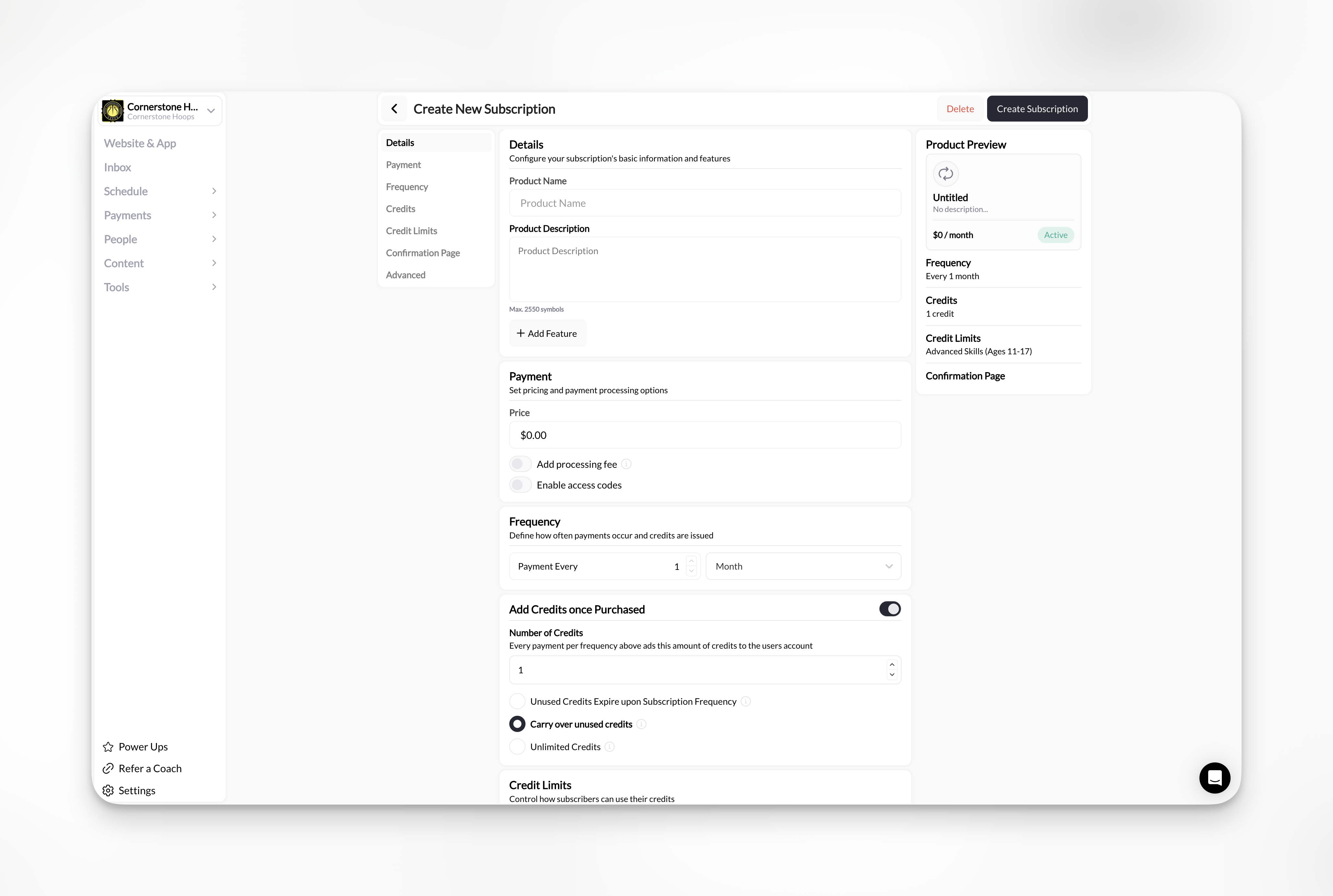
## Subscription Products
**Recurring billing on a schedule**
Client's card charges automatically each billing period (monthly, quarterly, annually) until they cancel.
**Automatic renewal.** No manual re-purchasing. Charges continue until canceled.
**Best for recurring revenue:**
* Monthly unlimited training
* Weekly session packages (e.g., 4 credits per month)
* Facility memberships
* Program access with monthly fee
* Ongoing coaching packages
* VIP or premium tiers
Use Subscription products when you want predictable recurring revenue and clients want ongoing access.
Subscriptions reduce administrative work. No chasing payments each month—billing happens automatically.
**Required:**
* Product name
* Price
* Payment frequency (monthly, quarterly, semi-annually, annually)
**Optional but common:**
* Trial period: Free days before first charge
* Credits per period: Renew credits each billing cycle
* Credit expiration: Typically "when subscription ends"
* Processing fee: Who pays Stripe fees
**Customer experience:**
1. Client subscribes with card on file
2. First charge processes (or after trial period)
3. Credits issued (if configured)
4. Card charges automatically each period
5. New credits issued with each renewal
6. Client cancels when done
Clients can cancel subscriptions anytime. No penalties. Billing stops at end of current period.
**Unlimited monthly:**
* Name: "Unlimited Monthly Membership"
* Price: \$200/month
* Frequency: Monthly
* Credits: 999 per month (effectively unlimited)
* Use: Client books as many sessions as they want
**4-session monthly package:**
* Name: "4 Sessions Per Month"
* Price: \$280/month
* Frequency: Monthly
* Credits: 4 per month
* Expiration: End of billing period
* Use: Client gets 4 credits every month, unused credits don't roll over
**Quarterly program access:**
* Name: "Quarterly Training Program"
* Price: \$450 every 3 months
* Frequency: Quarterly
* Credits: None (access-based, not session-based)
* Use: Client maintains access to program content as long as subscribed
## Access Code Products
**Code redemption for special access**
Client enters a specific code during checkout to receive a discount or free access.
**Code required.** Without the code, this product doesn't appear as a purchase option.
**Best for special access scenarios:**
* Corporate partnership codes (company pays for employees)
* Sponsor or donor free access
* Team discount codes
* Referral program offers
* Promotional campaigns
* Scholarship codes
* Beta tester access
Use Access Code products when specific groups need special pricing or free access that shouldn't be publicly available.
Access Code products are hidden from regular purchase flows. Only people with the code can access them.
**Required:**
* Product name
* Price (can be \$0 for free access)
* Access codes (at least one code)
**Optional but common:**
* Redemption limits: How many times each code can be used
* Credits: Issue credits upon redemption
* Processing fee: Who pays Stripe fees (if price > \$0)
**Customer experience:**
1. Client receives code from you or partner
2. Client enters code during booking or checkout
3. Discount applies or product becomes free
4. Client completes purchase
5. Access or credits granted
Track code usage in the Product Builder to see how many times each code has been redeemed.
**Corporate partnership (free):**
* Name: "IBM Employee Access"
* Price: \$0
* Code: IBM2025
* Redemption limit: 500 uses
* Use: IBM employees train for free
**Sponsor discount:**
* Name: "Sponsor Partnership - 50% Off"
* Price: $37.50 (50% off regular $75)
* Code: SPONSOR50
* Redemption limit: 100 uses
* Use: Sponsor's clients get half-price sessions
**Team code:**
* Name: "High School Team Package"
* Price: \$500 (normally \$750)
* Code: HSBASKETBALL
* Redemption limit: 15 uses (one per player)
* Use: Team gets bulk discount
## Product type comparison
| Feature | One-Time | Subscription | Access Code |
| --------------------- | -------------------------- | ----------------------------- | ------------------------------ |
| **Payment** | Single charge | Recurring billing | Single charge |
| **Billing frequency** | Once | Monthly/Quarterly/Annual | Once |
| **Price** | Any amount | Any amount | Any amount (including \$0) |
| **Credits** | Optional | Optional (renews each period) | Optional |
| **Code required** | No | No | Yes |
| **Trial period** | No | Yes | No |
| **Automatic renewal** | Never | Until canceled | Never |
| **Best for** | Sessions, packages, events | Memberships, ongoing access | Partners, promos, scholarships |
## Choosing the right type
**Once** → One-Time or Access Code
**Recurring** → Subscription
**Yes, anyone can buy** → One-Time or Subscription
**No, special access only** → Access Code
**Specific session(s)** → One-Time
**Ongoing access or credits** → Subscription
**Discounted or free access** → Access Code
## Can you change product type later?
**No.** Product type is permanent once created.
If you need to change types:
1. Create a new product with correct type
2. Archive the old product
3. Update schedulers/programs to use new product
Changing product type requires creating a new product. Existing purchases and active subscriptions continue with the old product.
## Multiple product types for the same offering
You can create multiple products for the same service:
**Example: Training sessions**
* One-Time: "\$75 Single Session"
* One-Time: "\$650 for 10 Sessions"
* Subscription: "\$280/month for 4 Sessions"
* Access Code: "Corporate Partner - Free"
All products attach to the same scheduler. Client chooses which payment option works best for them.
Offering multiple pricing options increases conversions. Some clients prefer packages, others prefer subscriptions.
## Related articles
* [Product Builder: Complete Reference](/payments/product-builder)
* [Coupons Overview](/payments/coupon-overview)
## One-Time Products
**Single purchase with one-time payment**
Client pays once and receives immediate access to what they purchased.
**No recurring billing.** No automatic renewals. One transaction, one delivery.
**Best for individual purchases:**
* Single training sessions
* Skills assessments or evaluations
* One-time workshops or clinics
* Summer camps
* Multi-session packages (pay once, use over time)
* Program access with lifetime purchase
* Merchandise or equipment
Use One-Time products when clients buy something specific with no ongoing billing.
**Required:**
* Product name
* Price
**Optional but common:**
* Credits: Issue credits for session bookings
* Credit expiration: When credits expire
* Processing fee: Who pays Stripe fees
* Confirmation page: Where client goes after purchase
**Customer experience:**
1. Client selects product
2. Pays once
3. Receives credits or access immediately
4. No future charges
Simplest product type. Great starting point for most coaches.
**Single session:**
* Name: "60-Minute Training Session"
* Price: \$75
* Credits: None
* Use: Client books one session
**Session package:**
* Name: "10-Session Package"
* Price: \$650
* Credits: 10 credits
* Expiration: 90 days
* Use: Client books 10 sessions over 3 months
**Workshop:**
* Name: "Weekend Skills Clinic"
* Price: \$150
* Credits: None
* Use: Client registers for specific event
## Subscription Products
**Recurring billing on a schedule**
Client's card charges automatically each billing period (monthly, quarterly, annually) until they cancel.
**Automatic renewal.** No manual re-purchasing. Charges continue until canceled.
**Best for recurring revenue:**
* Monthly unlimited training
* Weekly session packages (e.g., 4 credits per month)
* Facility memberships
* Program access with monthly fee
* Ongoing coaching packages
* VIP or premium tiers
Use Subscription products when you want predictable recurring revenue and clients want ongoing access.
Subscriptions reduce administrative work. No chasing payments each month—billing happens automatically.
**Required:**
* Product name
* Price
* Payment frequency (monthly, quarterly, semi-annually, annually)
**Optional but common:**
* Trial period: Free days before first charge
* Credits per period: Renew credits each billing cycle
* Credit expiration: Typically "when subscription ends"
* Processing fee: Who pays Stripe fees
**Customer experience:**
1. Client subscribes with card on file
2. First charge processes (or after trial period)
3. Credits issued (if configured)
4. Card charges automatically each period
5. New credits issued with each renewal
6. Client cancels when done
Clients can cancel subscriptions anytime. No penalties. Billing stops at end of current period.
**Unlimited monthly:**
* Name: "Unlimited Monthly Membership"
* Price: \$200/month
* Frequency: Monthly
* Credits: 999 per month (effectively unlimited)
* Use: Client books as many sessions as they want
**4-session monthly package:**
* Name: "4 Sessions Per Month"
* Price: \$280/month
* Frequency: Monthly
* Credits: 4 per month
* Expiration: End of billing period
* Use: Client gets 4 credits every month, unused credits don't roll over
**Quarterly program access:**
* Name: "Quarterly Training Program"
* Price: \$450 every 3 months
* Frequency: Quarterly
* Credits: None (access-based, not session-based)
* Use: Client maintains access to program content as long as subscribed
## Access Code Products
**Code redemption for special access**
Client enters a specific code during checkout to receive a discount or free access.
**Code required.** Without the code, this product doesn't appear as a purchase option.
**Best for special access scenarios:**
* Corporate partnership codes (company pays for employees)
* Sponsor or donor free access
* Team discount codes
* Referral program offers
* Promotional campaigns
* Scholarship codes
* Beta tester access
Use Access Code products when specific groups need special pricing or free access that shouldn't be publicly available.
Access Code products are hidden from regular purchase flows. Only people with the code can access them.
**Required:**
* Product name
* Price (can be \$0 for free access)
* Access codes (at least one code)
**Optional but common:**
* Redemption limits: How many times each code can be used
* Credits: Issue credits upon redemption
* Processing fee: Who pays Stripe fees (if price > \$0)
**Customer experience:**
1. Client receives code from you or partner
2. Client enters code during booking or checkout
3. Discount applies or product becomes free
4. Client completes purchase
5. Access or credits granted
Track code usage in the Product Builder to see how many times each code has been redeemed.
**Corporate partnership (free):**
* Name: "IBM Employee Access"
* Price: \$0
* Code: IBM2025
* Redemption limit: 500 uses
* Use: IBM employees train for free
**Sponsor discount:**
* Name: "Sponsor Partnership - 50% Off"
* Price: $37.50 (50% off regular $75)
* Code: SPONSOR50
* Redemption limit: 100 uses
* Use: Sponsor's clients get half-price sessions
**Team code:**
* Name: "High School Team Package"
* Price: \$500 (normally \$750)
* Code: HSBASKETBALL
* Redemption limit: 15 uses (one per player)
* Use: Team gets bulk discount
## Product type comparison
| Feature | One-Time | Subscription | Access Code |
| --------------------- | -------------------------- | ----------------------------- | ------------------------------ |
| **Payment** | Single charge | Recurring billing | Single charge |
| **Billing frequency** | Once | Monthly/Quarterly/Annual | Once |
| **Price** | Any amount | Any amount | Any amount (including \$0) |
| **Credits** | Optional | Optional (renews each period) | Optional |
| **Code required** | No | No | Yes |
| **Trial period** | No | Yes | No |
| **Automatic renewal** | Never | Until canceled | Never |
| **Best for** | Sessions, packages, events | Memberships, ongoing access | Partners, promos, scholarships |
## Choosing the right type
**Once** → One-Time or Access Code
**Recurring** → Subscription
**Yes, anyone can buy** → One-Time or Subscription
**No, special access only** → Access Code
**Specific session(s)** → One-Time
**Ongoing access or credits** → Subscription
**Discounted or free access** → Access Code
## Can you change product type later?
**No.** Product type is permanent once created.
If you need to change types:
1. Create a new product with correct type
2. Archive the old product
3. Update schedulers/programs to use new product
Changing product type requires creating a new product. Existing purchases and active subscriptions continue with the old product.
## Multiple product types for the same offering
You can create multiple products for the same service:
**Example: Training sessions**
* One-Time: "\$75 Single Session"
* One-Time: "\$650 for 10 Sessions"
* Subscription: "\$280/month for 4 Sessions"
* Access Code: "Corporate Partner - Free"
All products attach to the same scheduler. Client chooses which payment option works best for them.
Offering multiple pricing options increases conversions. Some clients prefer packages, others prefer subscriptions.
## Related articles
* [Product Builder: Complete Reference](/payments/product-builder)
* [Coupons Overview](/payments/coupon-overview)