> ## Documentation Index
> Fetch the complete documentation index at: https://help.coachiq.io/llms.txt
> Use this file to discover all available pages before exploring further.
# Automation Playbook
> 11 ready-to-use automations for leads, onboarding, retention, credits, and events
**Where to find this**: Tools → Automations
These are the automations CoachIQ coaches use most. Find your goal, copy the setup, customize the message—you'll be up and running in minutes.
Several of these use **Scheduled Automations**, which run on a schedule (daily, weekly, monthly) instead of reacting to an event. If you're new to those, check out [Scheduled Automations](/automations/scheduled-automations) for a deeper explanation.
***
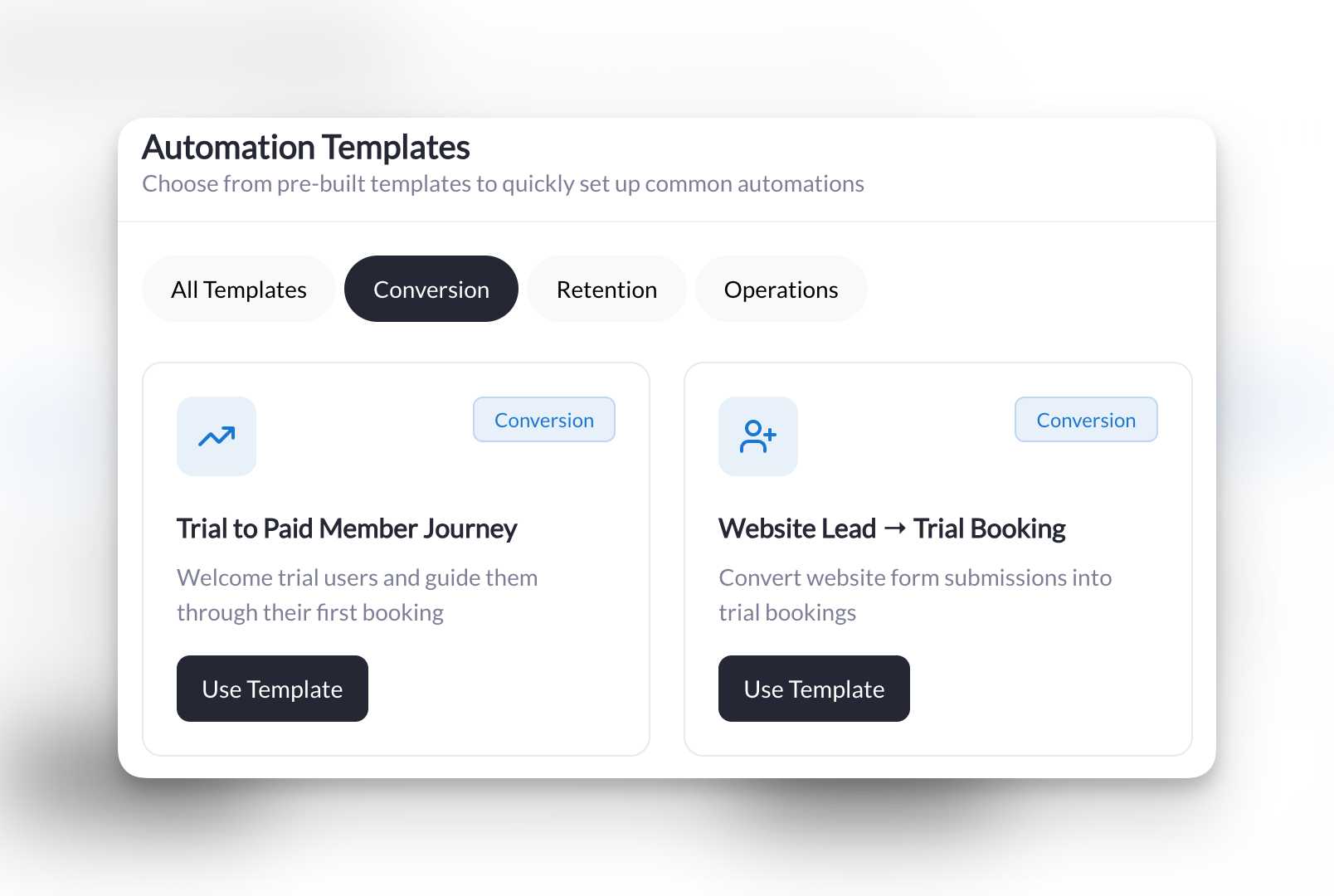
## Converting Leads & Trials
Turn website visitors into trial bookers, and trial bookers into paying members.
**What it does**: When someone fills out your trial request [form](/forms/overview), automatically send them an email with a link to [book their free session](/scheduling/creating-your-first-scheduler).
| Trigger | Condition | Action |
| -------- | ------------------ | ------------- |
| New Form | Is a specific form | Send an Email |
**Setup**:
1. **Trigger**: New Form
2. **Condition**: Is a specific form → Select your trial request or contact form
3. **Action**: Send an Email
* **To**: User from trigger
* **Subject**: `Your trial session at [Your Business Name]`
* **Attach Session**: Select your trial session
**Message template**:
```
Thanks for your interest! Click below to book your FREE trial session:
[Session link will be automatically included]
See you soon,
[Your Name]
```
**Pro tip**: Add a second action to tag them as "Trial Lead" so you can follow up if they don't book.
**What it does**: When someone books their very first session (a trial), send them a personal welcome message to get them excited.
| Trigger | Conditions | Action |
| ----------- | ----------------------------------------- | ---------------------- |
| New Booking | User's first booking ever = Yes | Send an In-App Message |
| | Is for a specific session = Trial Session | |
**Setup**:
1. **Trigger**: New Booking
2. **Conditions**:
* User's first booking ever → Yes
* Is for a specific session → Select your trial session
3. **Action**: Send an In-App Message
* **To**: User from trigger
**Message template**:
```
Welcome! Excited for your trial session on [date]. See you soon! 🎉
```
**Pro tip**: Keep this message short and warm. Save the detailed instructions for after they attend.
**What it does**: Every week, check for people who attended a trial but haven't booked again in 7+ days—then send them a nudge to come back.
| Trigger | Conditions | Action |
| --------------------------- | --------------------------- | ---------------------- |
| Scheduled Check | Has tag "Trial Attendee" | Send an In-App Message |
| Once a week, Monday 9:00 AM | Days since last booking > 7 | |
**Setup**:
1. **Trigger**: Scheduled Check
* **Schedule**: Once a week on Monday at 9:00 AM
2. **Conditions**:
* Has a specific tag → "Trial Attendee"
* Days since last booking is → Greater than 7 days
3. **Action**: Send an In-App Message
* **To**: User from trigger
* **Attach Session**: Select your main session
**Message template**:
```
Miss training with us? Come back this week—here's your schedule:
[Session link will be automatically included]
```
**Pro tip**: Make sure to add the "Trial Attendee" tag when someone completes their trial (you can automate this too using the Booking Completed trigger).
 ***
## Welcoming New Members
Make every new member feel like they made the right decision.
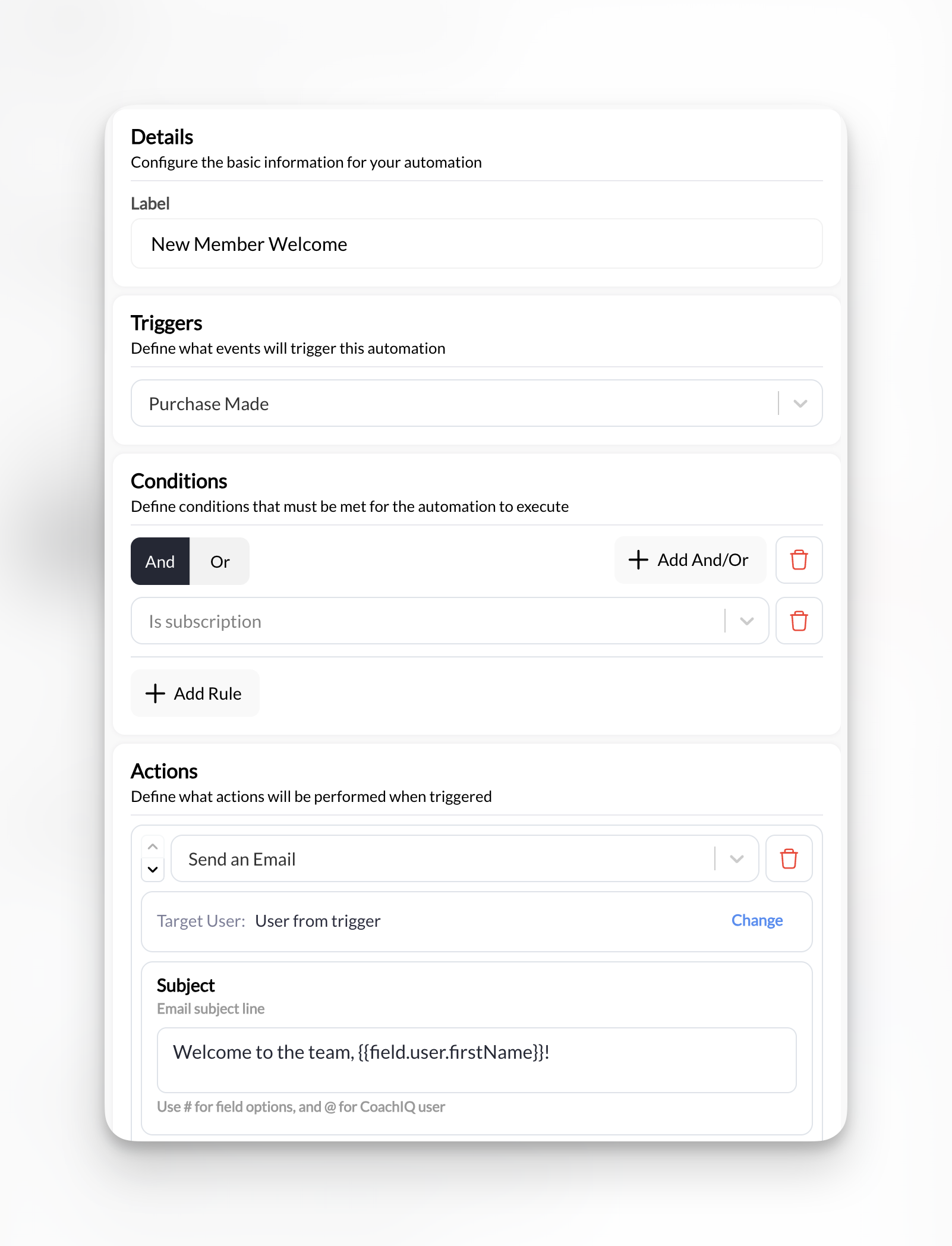
**What it does**: When someone [purchases a subscription](/payments/product-overview), automatically send a welcome email with [booking instructions](/scheduling/overview) and [tag](/people/tags-filters) them as an active member.
| Trigger | Condition | Actions |
| ------------ | ----------------------- | -------------------------- |
| New Purchase | Is a subscription = Yes | 1. Send an Email |
| | | 2. Add tag "Active Member" |
**Setup**:
1. **Trigger**: New Purchase
2. **Condition**: Is a subscription → Yes
3. **Action 1**: Send an Email
* **To**: User from trigger
* **Subject**: `Welcome to the team, @User.FirstName!`
* **Attach Session**: Select your intro or main session
4. **Action 2**: Add a Tag to a User
* **Tag**: "Active Member"
**Message template**:
```
You're officially part of the [Your Business Name] family! Here's how to book your first session:
[Session link will be automatically included]
Welcome aboard,
[Your Name]
```
**Pro tip**: This is the automation from [Build Your First Automation](/automations/build-your-first-automation). If you already set that up, you're covered!
***
## Welcoming New Members
Make every new member feel like they made the right decision.
**What it does**: When someone [purchases a subscription](/payments/product-overview), automatically send a welcome email with [booking instructions](/scheduling/overview) and [tag](/people/tags-filters) them as an active member.
| Trigger | Condition | Actions |
| ------------ | ----------------------- | -------------------------- |
| New Purchase | Is a subscription = Yes | 1. Send an Email |
| | | 2. Add tag "Active Member" |
**Setup**:
1. **Trigger**: New Purchase
2. **Condition**: Is a subscription → Yes
3. **Action 1**: Send an Email
* **To**: User from trigger
* **Subject**: `Welcome to the team, @User.FirstName!`
* **Attach Session**: Select your intro or main session
4. **Action 2**: Add a Tag to a User
* **Tag**: "Active Member"
**Message template**:
```
You're officially part of the [Your Business Name] family! Here's how to book your first session:
[Session link will be automatically included]
Welcome aboard,
[Your Name]
```
**Pro tip**: This is the automation from [Build Your First Automation](/automations/build-your-first-automation). If you already set that up, you're covered!
 ***
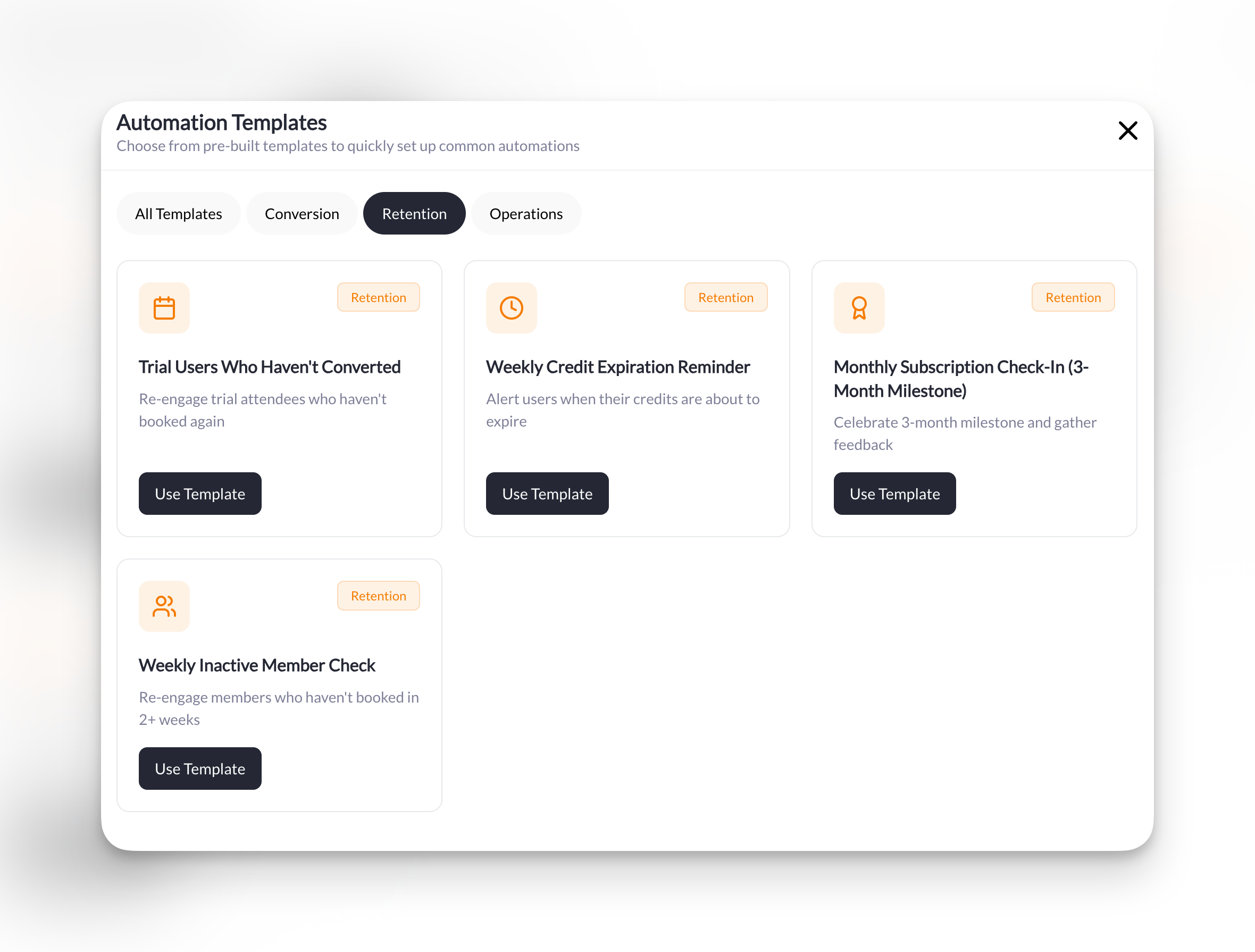
## Keeping Members Active
Catch disengaged members before they cancel and keep your credit users booking sessions.
**What it does**: Every week, find members who haven't trained in 14+ days and send them a friendly nudge to book a session.
| Trigger | Conditions | Action |
| --------------------------- | ----------------------------- | ---------------------- |
| Scheduled Check | Days since last booking > 14 | Send an In-App Message |
| Once a week, Sunday 6:00 PM | Has active subscription = Yes | |
**Setup**:
1. **Trigger**: Scheduled Check
* **Schedule**: Once a week on Sunday at 6:00 PM
2. **Conditions**:
* Days since last booking is → Greater than 14 days
* Has active subscription → Yes
3. **Action**: Send an In-App Message
* **To**: User from trigger
* **Attach Session**: Select your primary session
**Message template**:
```
We miss you! It's been @User.DaysSinceLastBooking days since your last session. Come back this week?
[Session link will be automatically included]
```
**Pro tip**: Sunday evening is a great time for this—people are planning their week ahead.
**What it does**: Every week, find members whose credits expire in less than 7 days and remind them to book before they lose them.
| Trigger | Condition | Action |
| --------------------------- | ------------------------------ | ---------------------- |
| Scheduled Check | Days until credits expire \< 7 | Send an In-App Message |
| Once a week, Monday 9:00 AM | | |
**Setup**:
1. **Trigger**: Scheduled Check
* **Schedule**: Once a week on Monday at 9:00 AM
2. **Condition**: Days until credits expire is → Less than 7 days
3. **Action**: Send an In-App Message
* **To**: User from trigger
* **Attach Session**: Select any session
**Message template**:
```
You have @User.CreditsExpiring credits expiring in @User.DaysUntilExpiration days! Book your sessions now:
[Session link will be automatically included]
```
**Pro tip**: The dynamic fields `@User.CreditsExpiring` and `@User.DaysUntilExpiration` make this message urgent and personal without any manual work.
**What it does**: On the 1st of each month, check for members hitting their 3-month milestone and send them a celebration message.
| Trigger | Conditions | Actions |
| ----------------------------- | ----------------------------- | ------------------------------ |
| Scheduled Check | Has tag "3-Month Member" | 1. Send an In-App Message |
| Once a month, 1st at 10:00 AM | Has active subscription = Yes | 2. Remove tag "3-Month Member" |
**Setup**:
1. **Trigger**: Scheduled Check
* **Schedule**: Once a month on 1st at 10:00 AM
2. **Conditions**:
* Has a specific tag → "3-Month Member"
* Has active subscription → Yes
3. **Action 1**: Send an In-App Message
* **To**: User from trigger
4. **Action 2**: Remove a Tag from a User
* **Tag**: "3-Month Member"
**Message template**:
```
You've been training with us for 3 months! 🎉 How's your experience going? Hit reply and let me know!
```
**How milestone tags work**: You'll need a system to add the "3-Month Member" tag when someone hits that milestone. Some coaches do this manually, others create an automation based on subscription duration. The automation then removes the tag so they don't get the message twice.
***
## Keeping Members Active
Catch disengaged members before they cancel and keep your credit users booking sessions.
**What it does**: Every week, find members who haven't trained in 14+ days and send them a friendly nudge to book a session.
| Trigger | Conditions | Action |
| --------------------------- | ----------------------------- | ---------------------- |
| Scheduled Check | Days since last booking > 14 | Send an In-App Message |
| Once a week, Sunday 6:00 PM | Has active subscription = Yes | |
**Setup**:
1. **Trigger**: Scheduled Check
* **Schedule**: Once a week on Sunday at 6:00 PM
2. **Conditions**:
* Days since last booking is → Greater than 14 days
* Has active subscription → Yes
3. **Action**: Send an In-App Message
* **To**: User from trigger
* **Attach Session**: Select your primary session
**Message template**:
```
We miss you! It's been @User.DaysSinceLastBooking days since your last session. Come back this week?
[Session link will be automatically included]
```
**Pro tip**: Sunday evening is a great time for this—people are planning their week ahead.
**What it does**: Every week, find members whose credits expire in less than 7 days and remind them to book before they lose them.
| Trigger | Condition | Action |
| --------------------------- | ------------------------------ | ---------------------- |
| Scheduled Check | Days until credits expire \< 7 | Send an In-App Message |
| Once a week, Monday 9:00 AM | | |
**Setup**:
1. **Trigger**: Scheduled Check
* **Schedule**: Once a week on Monday at 9:00 AM
2. **Condition**: Days until credits expire is → Less than 7 days
3. **Action**: Send an In-App Message
* **To**: User from trigger
* **Attach Session**: Select any session
**Message template**:
```
You have @User.CreditsExpiring credits expiring in @User.DaysUntilExpiration days! Book your sessions now:
[Session link will be automatically included]
```
**Pro tip**: The dynamic fields `@User.CreditsExpiring` and `@User.DaysUntilExpiration` make this message urgent and personal without any manual work.
**What it does**: On the 1st of each month, check for members hitting their 3-month milestone and send them a celebration message.
| Trigger | Conditions | Actions |
| ----------------------------- | ----------------------------- | ------------------------------ |
| Scheduled Check | Has tag "3-Month Member" | 1. Send an In-App Message |
| Once a month, 1st at 10:00 AM | Has active subscription = Yes | 2. Remove tag "3-Month Member" |
**Setup**:
1. **Trigger**: Scheduled Check
* **Schedule**: Once a month on 1st at 10:00 AM
2. **Conditions**:
* Has a specific tag → "3-Month Member"
* Has active subscription → Yes
3. **Action 1**: Send an In-App Message
* **To**: User from trigger
4. **Action 2**: Remove a Tag from a User
* **Tag**: "3-Month Member"
**Message template**:
```
You've been training with us for 3 months! 🎉 How's your experience going? Hit reply and let me know!
```
**How milestone tags work**: You'll need a system to add the "3-Month Member" tag when someone hits that milestone. Some coaches do this manually, others create an automation based on subscription duration. The automation then removes the tag so they don't get the message twice.
 ***
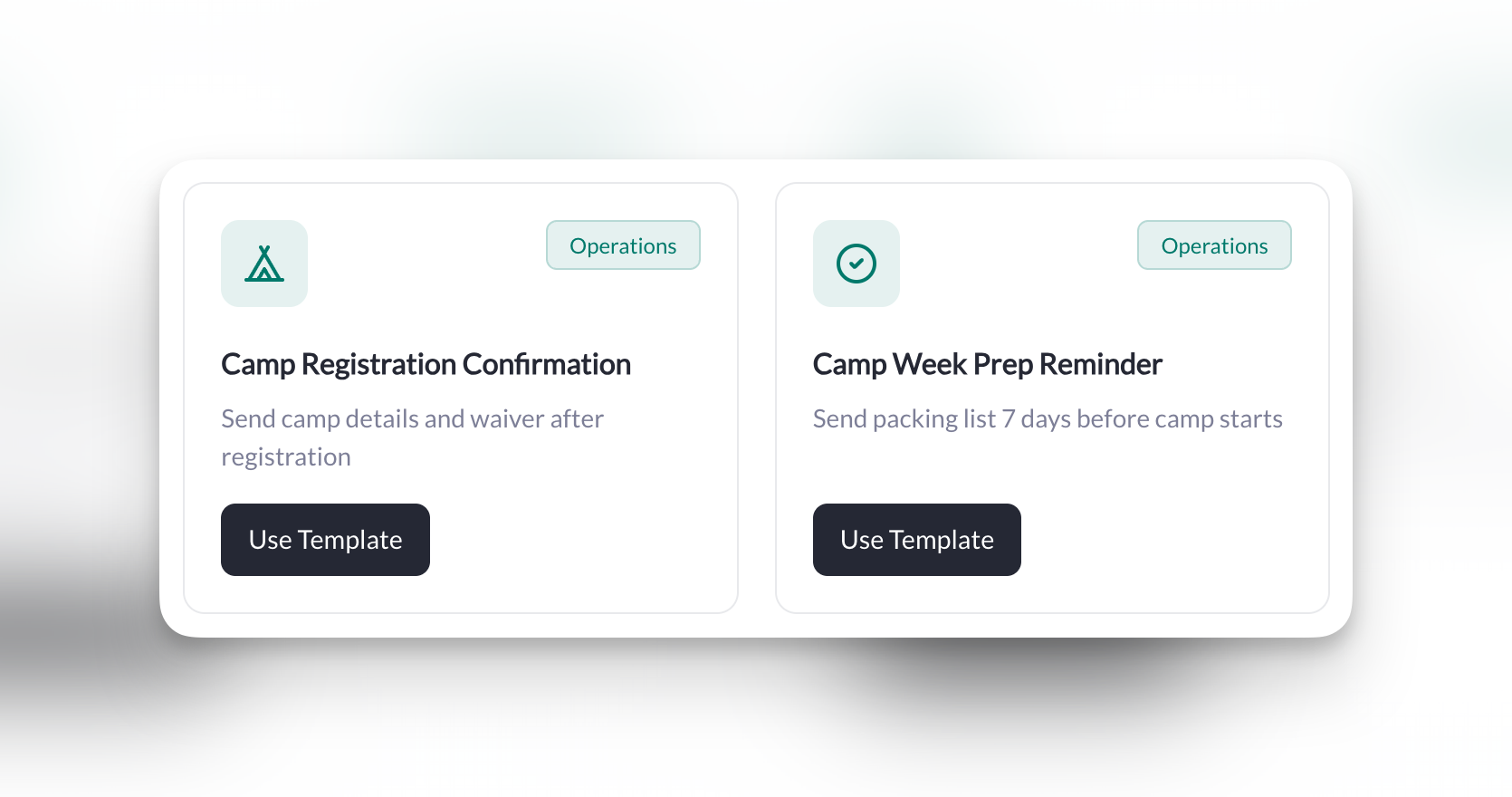
## Camps & Events
Streamline registration confirmations and pre-event communication.
**What it does**: When someone purchases a camp, automatically send a confirmation email and tag them for future camp communications.
| Trigger | Condition | Actions |
| ------------ | ------------------------------- | -------------------------- |
| New Purchase | Is a specific product = \[Camp] | 1. Send an Email |
| | | 2. Add tag "Camp Attendee" |
**Setup**:
**Trigger**: New Purchase
2. **Condition**: Is a specific product → Select your camp product
3. **Action 1**: Send an Email
* **To**: User from trigger
* **Subject**: `You're registered for camp!`
4. **Action 2**: Add a Tag to a User
* **Tag**: "Camp Attendee"
**Message template**:
```
Can't wait to see @User.FirstName at camp! Check-in is at 9 AM on Day 1.
Questions? Just reply to this email.
See you there!
[Your Name]
```
**Pro tip**: Create a separate tag for each camp (e.g., "Summer Camp 2025") so you can send targeted updates.
**What it does**: One week before camp starts, send registered families a prep email with packing list and schedule.
| Trigger | Condition | Actions |
| --------------------- | ------------------------ | ------------------------------ |
| Scheduled Check | Has tag "Camp Next Week" | 1. Send an Email |
| Every day at 10:00 AM | | 2. Remove tag "Camp Next Week" |
**Setup**:
1. **Trigger**: Scheduled Check
* **Schedule**: Every day at 10:00 AM
2. **Condition**: Has a specific tag → "Camp Next Week"
3. **Action 1**: Send an Email
* **To**: User from trigger
* **Subject**: `Camp starts in 7 days! Here's what to bring 🎒`
* **Attach Form**: Select your camp info form (packing list, waiver, etc.)
4. **Action 2**: Remove a Tag from a User
* **Tag**: "Camp Next Week"
**Message template**:
```
Getting ready for camp! Here's your packing list and schedule:
[Form link will be automatically included]
See you soon!
[Your Name]
```
**How to use this**: Add the "Camp Next Week" tag to all registered campers 7 days before camp starts. The automation will send the reminder and remove the tag so they only get it once.
***
## Camps & Events
Streamline registration confirmations and pre-event communication.
**What it does**: When someone purchases a camp, automatically send a confirmation email and tag them for future camp communications.
| Trigger | Condition | Actions |
| ------------ | ------------------------------- | -------------------------- |
| New Purchase | Is a specific product = \[Camp] | 1. Send an Email |
| | | 2. Add tag "Camp Attendee" |
**Setup**:
**Trigger**: New Purchase
2. **Condition**: Is a specific product → Select your camp product
3. **Action 1**: Send an Email
* **To**: User from trigger
* **Subject**: `You're registered for camp!`
4. **Action 2**: Add a Tag to a User
* **Tag**: "Camp Attendee"
**Message template**:
```
Can't wait to see @User.FirstName at camp! Check-in is at 9 AM on Day 1.
Questions? Just reply to this email.
See you there!
[Your Name]
```
**Pro tip**: Create a separate tag for each camp (e.g., "Summer Camp 2025") so you can send targeted updates.
**What it does**: One week before camp starts, send registered families a prep email with packing list and schedule.
| Trigger | Condition | Actions |
| --------------------- | ------------------------ | ------------------------------ |
| Scheduled Check | Has tag "Camp Next Week" | 1. Send an Email |
| Every day at 10:00 AM | | 2. Remove tag "Camp Next Week" |
**Setup**:
1. **Trigger**: Scheduled Check
* **Schedule**: Every day at 10:00 AM
2. **Condition**: Has a specific tag → "Camp Next Week"
3. **Action 1**: Send an Email
* **To**: User from trigger
* **Subject**: `Camp starts in 7 days! Here's what to bring 🎒`
* **Attach Form**: Select your camp info form (packing list, waiver, etc.)
4. **Action 2**: Remove a Tag from a User
* **Tag**: "Camp Next Week"
**Message template**:
```
Getting ready for camp! Here's your packing list and schedule:
[Form link will be automatically included]
See you soon!
[Your Name]
```
**How to use this**: Add the "Camp Next Week" tag to all registered campers 7 days before camp starts. The automation will send the reminder and remove the tag so they only get it once.
 ***
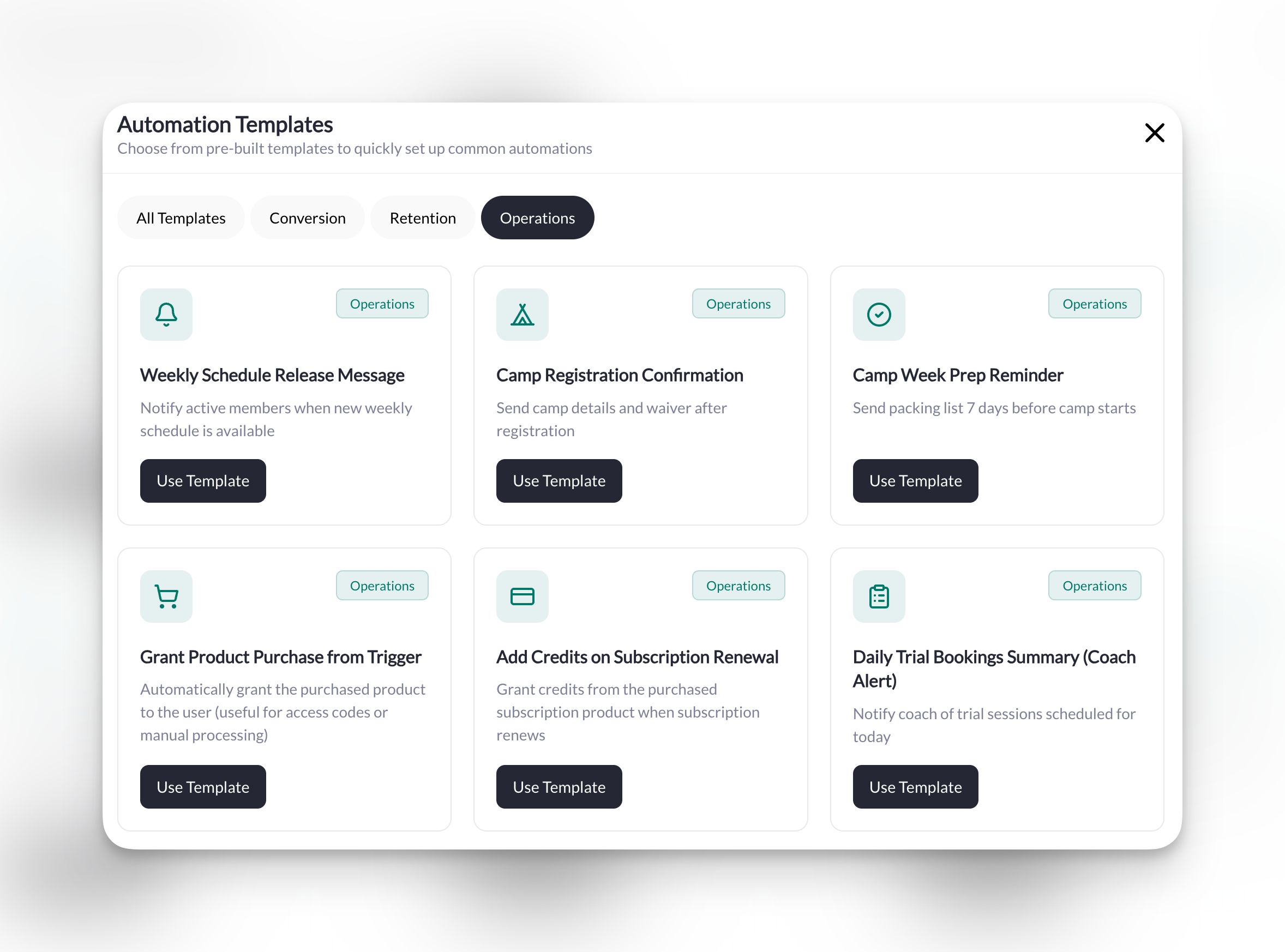
## Weekly Operations
Automate your recurring announcements and stay on top of your schedule.
**What it does**: Every Monday morning, announce that the weekly schedule is live and prompt members to book their sessions.
| Trigger | Condition | Action |
| --------------------------- | ----------------------------- | -------------------- |
| Scheduled Check | Has active subscription = Yes | Send an Announcement |
| Once a week, Monday 8:00 AM | | |
**Setup**:
1. **Trigger**: Scheduled Check
* **Schedule**: Once a week on Monday at 8:00 AM
2. **Condition**: Has active subscription → Yes
3. **Action**: Send an [Announcement](/inbox/announcements)
* **To**: Specific tag → "Active Members"
* **Title**: `This Week's Schedule is LIVE! 🗓️`
* **Attach Session**: Select your primary training session
**Message template**:
```
Hey team! This week's sessions are ready to book. Grab your spots now!
[Session link will be automatically included]
```
**Pro tip**: Use an Announcement (not individual messages) so it appears once in your feed rather than spamming everyone's inbox.
**What it does**: Every morning, get a notification about any trial sessions happening today so you're prepared to convert.
| Trigger | Conditions | Action |
| -------------------- | ---------------------------------------- | ---------------------- |
| Scheduled Check | Has upcoming booking = Has booking today | Send an In-App Message |
| Every day at 7:00 AM | Has tag "Trial User" | |
**Setup**:
1. **Trigger**: Scheduled Check
* **Schedule**: Every day at 7:00 AM
2. **Conditions**:
* Has upcoming booking → Has booking today
* Has a specific tag → "Trial User"
3. **Action**: Send an In-App Message
* **To**: Specific user → Select yourself (the coach)
**Message template**:
```
📋 Today's Trial Sessions: @User.FullName has a trial today.
```
**This one's different**: Most automations message your members. This one messages YOU—it's a daily briefing so you never forget about a trial.
***
## Weekly Operations
Automate your recurring announcements and stay on top of your schedule.
**What it does**: Every Monday morning, announce that the weekly schedule is live and prompt members to book their sessions.
| Trigger | Condition | Action |
| --------------------------- | ----------------------------- | -------------------- |
| Scheduled Check | Has active subscription = Yes | Send an Announcement |
| Once a week, Monday 8:00 AM | | |
**Setup**:
1. **Trigger**: Scheduled Check
* **Schedule**: Once a week on Monday at 8:00 AM
2. **Condition**: Has active subscription → Yes
3. **Action**: Send an [Announcement](/inbox/announcements)
* **To**: Specific tag → "Active Members"
* **Title**: `This Week's Schedule is LIVE! 🗓️`
* **Attach Session**: Select your primary training session
**Message template**:
```
Hey team! This week's sessions are ready to book. Grab your spots now!
[Session link will be automatically included]
```
**Pro tip**: Use an Announcement (not individual messages) so it appears once in your feed rather than spamming everyone's inbox.
**What it does**: Every morning, get a notification about any trial sessions happening today so you're prepared to convert.
| Trigger | Conditions | Action |
| -------------------- | ---------------------------------------- | ---------------------- |
| Scheduled Check | Has upcoming booking = Has booking today | Send an In-App Message |
| Every day at 7:00 AM | Has tag "Trial User" | |
**Setup**:
1. **Trigger**: Scheduled Check
* **Schedule**: Every day at 7:00 AM
2. **Conditions**:
* Has upcoming booking → Has booking today
* Has a specific tag → "Trial User"
3. **Action**: Send an In-App Message
* **To**: Specific user → Select yourself (the coach)
**Message template**:
```
📋 Today's Trial Sessions: @User.FullName has a trial today.
```
**This one's different**: Most automations message your members. This one messages YOU—it's a daily briefing so you never forget about a trial.
 ***
## What's Next?
Learn how scheduled automations work—the trigger behind credit reminders, inactive member checks, and weekly operations.
See every trigger, condition, action, and dynamic field available in CoachIQ automations.
## Related articles
Create the forms that trigger lead-capture automations
Set up memberships, credit packs, and camps that trigger purchase automations
Manage sessions referenced in booking automations
Learn about the announcement action used in weekly operations automations
Organize members with tags used throughout these playbook automations
See how form responses connect to automation triggers
***
## What's Next?
Learn how scheduled automations work—the trigger behind credit reminders, inactive member checks, and weekly operations.
See every trigger, condition, action, and dynamic field available in CoachIQ automations.
## Related articles
Create the forms that trigger lead-capture automations
Set up memberships, credit packs, and camps that trigger purchase automations
Manage sessions referenced in booking automations
Learn about the announcement action used in weekly operations automations
Organize members with tags used throughout these playbook automations
See how form responses connect to automation triggers